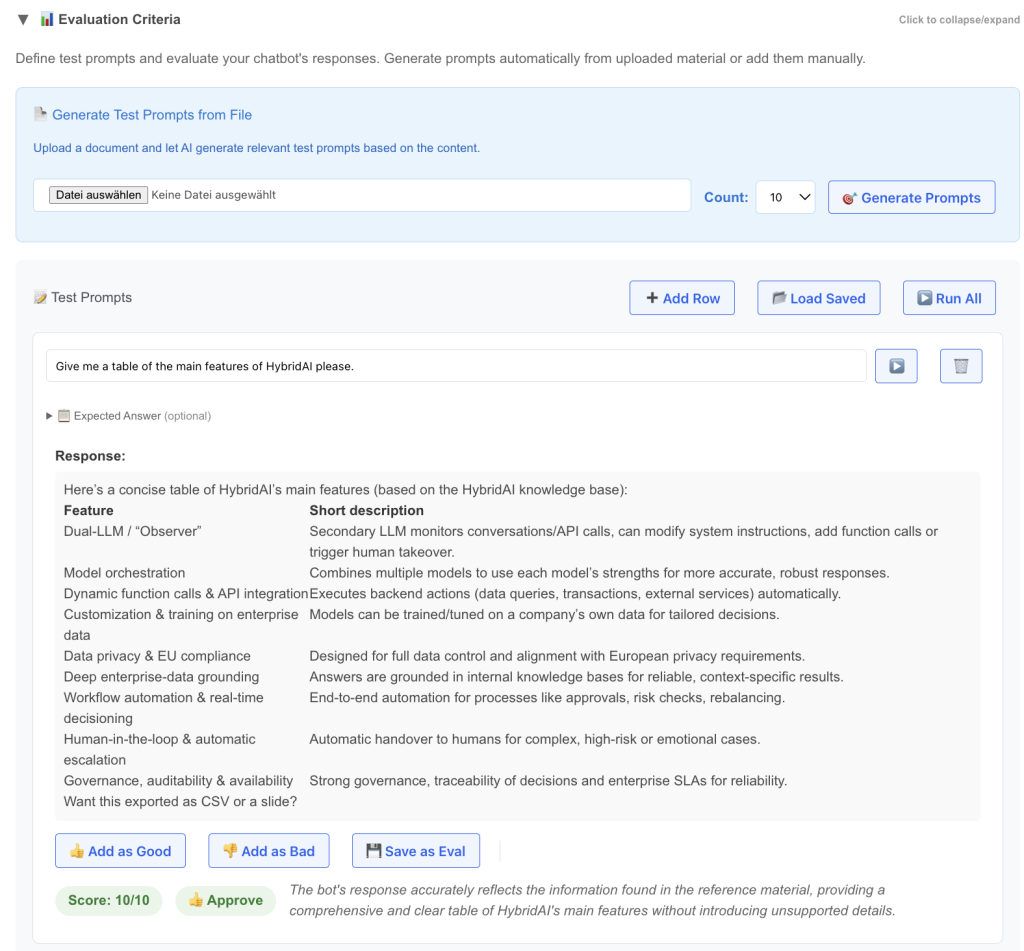
Today we launched a new feature in the Prompt-Tuning-Clinic – the “Evaluation Criteria” Section.
It’s one of the most annoying things in AI to hunt for the question whether a custom configured AI (ChatBot, Agent, Automation) is doing well or not. In most cases both suppliers and customers are treating it like this:
“Yesterday i did run this prompt against it, and it looked really well, good progress!” – or – “My boss asked it to do x and it gave a total wrong answer, we have to redo the whole thing!”
Its an inherent problem of AI to some extent, for one because of the universal capability of these systems and the fact that you can ask practically everything and will always get an answer. And – due to the non-deterministic architecture and functioning of these systems it is very hard to define what it is doing and what not.
We were a bit tired of this, and so we thought – why are we reading LLMarena (btw – we launched german LLM-Arena recently, try it here) and other rankings of new AI models every second day and dont apply similar mechanisms to our customer installations?
This is exactly what this new feature brings:
- define a couple of test-prompts (you can upload some treatment material like your API-Documentation or an md-file of the Website and let the AI make proposals for test-prompts)
- run these prompts against the current configuration of the bot
- Evaluate them (can also be done with an LLM automatically)
- Define correct answers for edge cases
- Save those prompts that are important permanently
- Give them thumbs up/down to create cases for Fine-Tuning and DSPy
- Run them all to get a quality ranking
Once this is set up the game is changing drastically, because now we (both supplier and customer) do have a well defined test-set of intended behavior that can be run automatically.
This is not only good for initial setup of a system, but also for Improvements, Model-Updates, new Settings etc.
And: as we are also offering fine-tuning for our models and have integrated DSPy as automated Prompt-Tuning tool you can create training-data for these while creating your Evaluation-Set as well – just thumbs up/down on the answer creates an entry in the test-database for later.
Sign up for a free Account and try it out!