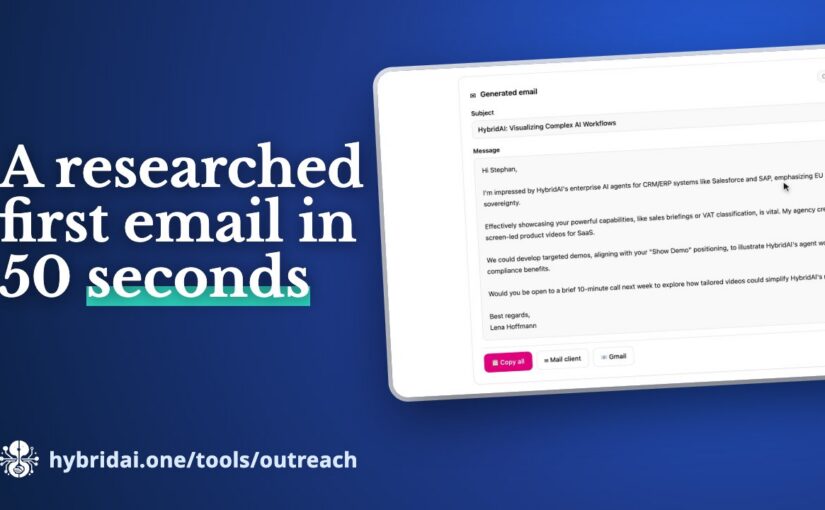
In short: In 2026 a first sales email gets read when it shows you looked into the person and their company. The hybridAI Outreach Tool does that research in under a minute: it finds the email address, researches the person and the company with sources, lists concrete hooks for your offer and writes the email from it. Five requests are free.
Step
By hand
With the Outreach Tool
Find the email address
guess, try several tools
with a confidence score and the LinkedIn profile
Research person and company
about 20 minutes
with sources, in parallel
Hooks for your offer
in your head
listed concretely
Write the email
yourself
subject, personal greeting, reference, next step
Total time
20+ minutes
just under 1 minute (our test)
Cost
your working time
5 requests free
Anyone in sales knows the difference: an email that opens with “Dear Sir or Madam, we are a leading provider…” gets deleted. An email that shows someone actually looked into the person and their company gets read. The difference is research – and research takes time: who is this person, what is the company doing right now, where does my offer fit, and what is the email address in the first place?
The Outreach Tool by hybridAI does these steps together.
Who do you want to reach – and with what?
You only enter a few things: the person’s name and company, optionally the domain, your offer, your name as the sender, a template – cold outreach, catch-up, re-activation or warm intro – and the language of the email. In the video, the tool researches Stephan Noller, founder of hybridAI, with his consent.
Then three things run at once: the search for the email address, the research on the person and the company, and the writing of the email. In our test, it took just under a minute.
Address, research, hooks
First the address – with a confidence score and the LinkedIn profile. Below that, the research: what is publicly known about the person and what the company does, each with sources. That is more than a business card; it is what a good first conversation is made of.
The most important part are the hooks: concrete points where your offer fits the person’s situation. Exactly the work you would otherwise do in your head after twenty minutes of research.
The email – and what comes next
From all of that, the email is written: subject line, personal greeting, a reference to what the research turned up, and a clear next step. You can copy it or open it straight in your mail client or Gmail. As with any generated text: read it, adjust it, then send it.
For working with more than one person, the tool also comes as an LLM skill. The package teaches an AI agent to use the hybridAI Outreach API – then your own agent researches and writes for a whole list at once. If you sorted your network with the LinkedIn Network Radar first, you already have that list.
Frequently asked questions
What does the Outreach Tool cost?
Five requests are free, no sign-up: hybridai.one/tools/outreach.
What kinds of emails does it write?
Four templates: cold outreach, catch-up, re-activation and warm intro – in the language you choose.
Can I use it for a whole list?
Yes, as an LLM skill: it teaches your AI agent the hybridAI Outreach API, and the agent then researches and writes for every contact on a list.
Can I send the email unchecked?
No. As with any generated text: read it, adjust it, then send it.
In short: ChatGPT, Claude and Gemini send their own web searches before they answer – and those often differ from what the model says it would search for. Those real searches are what you need to be found for in 2026. The hybridAI GEO Sniffer shows both side by side, plus the websites the answer relies on, the brands it recommends and a GEO strategy. Up to 15 requests a day are free.
What the GEO Sniffer shows
What it is
What you need it for
Asked
what the model says it would search for
how the model understands the question
Live
the web searches it actually sends
the queries you need to be found for
Sources
websites the answer relies on
the places you need to be present
Brands
products and providers it recommends
your competition in AI answers
GEO strategy
keywords, platforms, missing content, next steps
the to-do list for next week
What makes a page citable was examined in an analysis of 193,507 AI answers from ChatGPT, Google AI Mode and AI Overviews (August–October 2026) (AI Citation Study). It measured associations, not causes:
Trait
Citation odds
Year in the title
more than twice the odds
Updated in the last 12 months
+88 %
Tables
+69 % (+88 % in ChatGPT)
First-hand experience
+45 %
Prices on the page
+28 %
FAQ section
+26 %
Direct answer at the top
20 % of cited vs. 5 % of passed-over pages
When people used to look for a tool, a service provider or a piece of software, they googled it. Today more and more of them ask ChatGPT, Claude or Gemini instead – and get not a list of ten links but an answer with three or four recommendations. If you are not named there, you do not exist for that question.
For businesses, that is new territory. With Google, you roughly knew how it worked: keywords, rankings, backlinks. With AI assistants it is less transparent. They often search the web themselves before they answer – but what exactly they search for, and which pages they rely on in the end, you cannot see. Generative Engine Optimization, or GEO, therefore starts with a simple question: what actually happens between the question and the answer?
Ask the way your customers would
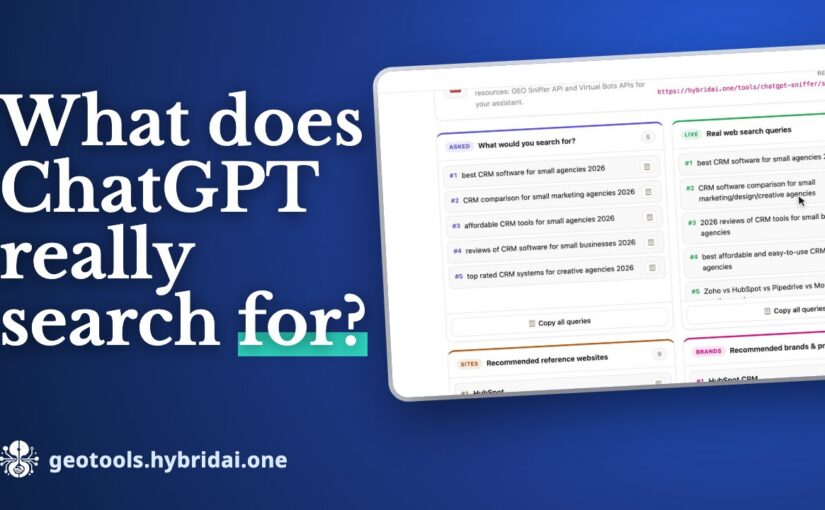
That is where the GEO Sniffer comes in. You pick a model – ChatGPT, Claude or Gemini – and ask a question the way your customers would. In our video, it is: “Which CRM software works best for small agencies?”
The result comes in two columns, and the difference between them is what is really interesting:
Asked – what the model says it would search for,
Live – the web searches it actually sends.
The two lists are often similar, but rarely the same. And it is the real searches you need to be found for.
Who the AI recommends – and what it relies on
Below that are the websites the model relies on for its answer and the brands and products it recommends. In our example, those were comparison and review sites on one side and the well-known CRM vendors on the other. The results are live and change a little with every request – just like the answers real users get.
That leads to a very concrete insight: these sources are the places where you need to be present if you want the AI to name you.
From analysis to a GEO strategy
It does not stop at the analysis. From the queries, sources and brands, the GEO Sniffer builds a GEO strategy: the keywords that matter, the platforms where it is easiest to get listed, ideas for content that is still missing, and concrete actions for the coming week.
And because every model searches differently, comparing is worth it: the same question to Claude or Gemini often brings different searches – and different recommendations.
In your own toolbox
You can copy all queries, websites and brands with one click. If you want to use the sniffer regularly, download it as an LLM skill – a ZIP with a SKILL.md and the resources your own AI assistant needs – or integrate it into your own workflows through the REST API.
Frequently asked questions
Which models can the GEO Sniffer query?
ChatGPT, Claude and Gemini. The same question to different models often brings different searches and different recommendations.
What does the GEO Sniffer cost?
Up to 15 requests a day are free: geotools.hybridai.one.
Why do “Asked” and “Live” differ?
What a model says about its search is not the same as the searches it really sends. For GEO, the real ones count.
Can I use it in my own workflows?
Yes, as an LLM skill for your own AI assistant or through the REST API.
In short: Your best lead list is often your own LinkedIn network – LinkedIn just does not show you who in it fits your offer. The hybridAI LinkedIn Network Radar reads your LinkedIn data export entirely in the browser, scores every contact for your offer (relevance 1 to 10), sorts your network into outreach segments and writes the first message. It is free, and your contact data never leaves your browser.
Segment
Who is in it
What you do with it
Hot leads
high score and already in touch
follow up now
Decision makers
C-level and VP level with high relevance
reach out deliberately
Dormant contacts
relevant, but never messaged
re-activation
Warm intros
contacts with a recommendation or endorsement
ask for an introduction
Most of us have a few hundred, often a few thousand LinkedIn connections. Former colleagues, past customers, people we met at a conference – and a surprising number who today make decisions exactly where our offer fits. The problem is not that these contacts are missing. The problem is that we cannot see them.
LinkedIn itself does not help much. You can scroll through your connections, but you cannot sort them by who is relevant for a specific offer, who you have already talked to, or who has gone quiet for two years. That is what we built the LinkedIn Network Radar for.
Your export as the starting point
LinkedIn lets everyone download a copy of their own data (Settings → Data privacy → “Get a copy of your data”). You drop that ZIP file into the radar. The analysis runs entirely in your browser – your contact data is not uploaded to a server for it. If you just want to look around first, you can start with the tool’s demo data, without an export and without signing up.
Before the dashboard is built, you tell the radar what it is about: what you offer, and which industries and positions you want to reach. Everything else follows from that – the score of every contact as well as the messages.
From a network to segments
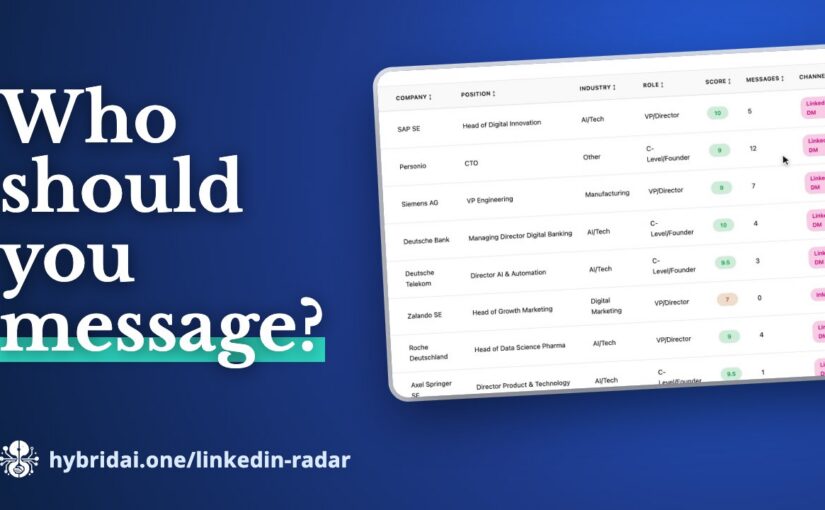
The dashboard first shows where you stand: how many contacts you have, how many you have exchanged messages with, and how many count as high-value targets. Below that, your network is broken down by industry and position.
The outreach segments are where it gets interesting. The radar sorts your contacts into groups you can work with right away:
Hot leads – highly scored and already in touch,
Decision makers – C-level and VP level with high relevance,
Dormant contacts – relevant, but never messaged,
Warm intros – contacts with a recommendation or endorsement.
One click on a segment filters the contact list. Every contact has a relevance score from 1 to 10, a relationship strength and the right channel.
The first message is already written
The part that saves the most time day to day: click a contact and the message is ready – with the right template, addressed personally, in English or German. There are templates for re-activation, cold intro, follow-up and warm intro; adjust them once and they apply to every contact. You can copy the message or open it straight in your mail client.
You collect contacts in your own lists, such as “Decision makers Q4”, and export them as CSV or as an email list.
Your network as a skill for your AI assistant
One button is easy to miss, but it may be the most important one: Create LLM skill. It packs your analysed network into a ZIP – with a SKILL.md, the enriched contacts, a search script and a tool definition. With it, an AI assistant knows your LinkedIn network and can answer questions like “Which C-level contacts do I have in finance?”.
That way you can – if you want to – bring your network into our own assistants too: into HybridClaw, Hy or the Sales Companion. With your contacts there, you can ask the assistant before a meeting who you know at a company, or have it put together a list for your next campaign.
For quick questions, the radar also has a network assistant: “Which decision makers do I have at banks?” – and the answer comes from your own contacts.
Frequently asked questions
Are my LinkedIn contacts uploaded?
No. The analysis runs entirely in the browser; the contact data is not uploaded to a server.
How do I get my LinkedIn export?
In LinkedIn under Settings → Data privacy → “Get a copy of your data”. Drop the ZIP file into the Radar. To try it, there is demo data – no export, no sign-up.
What does the Radar cost?
Nothing – it is a free hybridAI tool.
Can my AI assistant work with the network?
Yes. “Create LLM skill” packs the analysed network into a ZIP with a SKILL.md, the contacts, a search script and a tool definition – for HybridClaw, Hy, the Sales Companion or other assistants.
Try it
The LinkedIn Network Radar is part of the HybridAI Enterprise Assistant, and you can try it with demo data right in your browser: hybridai.one/linkedin-radar.
In short: An AI agent that sends emails or changes records on its own needs more than logs: you have to be able to follow every run (turn) and verify that the record of it is complete. Agent observability on the hybridAI platform records every turn with all tool and model calls, secures the events against gaps and tampering with sequence numbers and a hash chain, and raises alerts on anomalies. It is available for hosted HybridClaw agents.
Classic logging
Agent observability
What gets recorded
single events with a timestamp
the whole turn: model, tools, arguments, results, order
Missing data
goes unnoticed
shown as a gap, never reconstructed
Completeness
cannot be verified
sequence number and hash chain, status “broken” with a reason
A chatbot that gives a wrong answer is an annoyance. An agent that sends an email on its own, changes a record or drafts an offer is something else. It acts — and anything that acts has to be able to account for itself.
Most teams putting agents into production discover this at the first incident. The question lands on the table: what exactly happened here? And the honest answer is, surprisingly often, that nobody can say any more.
Why logs are not enough for agents
Classic logging was built for software that executes instructions. One line per event, timestamp, severity level. For a web server that is appropriate.
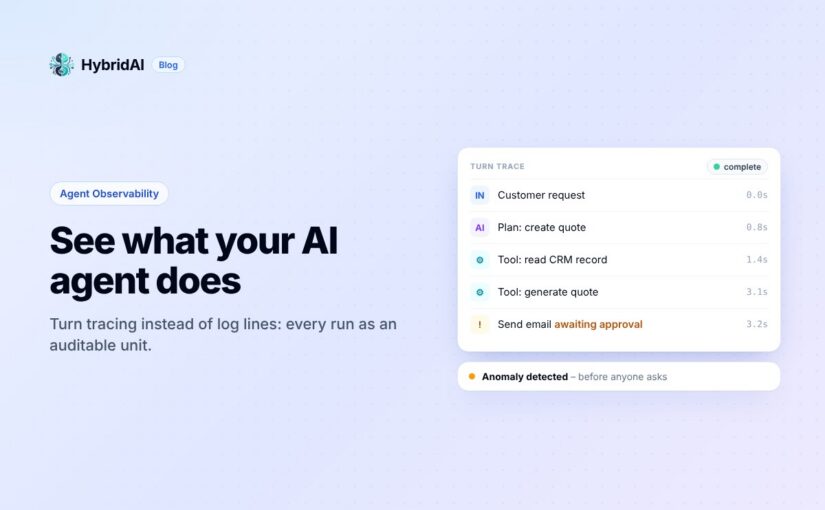
An agent works differently. Given an input, it decides for itself which tools to use, calls one, judges the result, possibly calls another, and eventually formulates an answer. We call that sequence a turn. What matters is not the individual event but the connection between them: which model was involved, which tools were called with which arguments, what came back — and at what point the decision was made that later turned into the problem.
A chat transcript shows only the surface of that: question in, answer out. Everything in between — which is precisely where the acting happens — stays invisible.
Turn tracing: the sequence as the unit
So we built observability around the turn rather than around the log line. A recorded turn opens up like a protocol: every tool call with its arguments, every result, every model call, in the order it actually happened.
That makes a practical difference. Faced with “why did the agent contact this customer?”, you no longer reconstruct a probable story from scattered log lines. You look at the sequence.
One detail we insisted on: the system does not fill gaps. Where execution history is missing, it says so rather than substituting a plausible-looking reconstruction. Evidence that guesses at the uncertain parts is worse than none, because people believe it.
Completeness you can verify
An agent runs in its own container, often on the customer’s side, and reports its events back to the platform. That raises an uncomfortable question: how do you know nothing was lost on the way — or altered afterwards?
Every event therefore carries a running sequence number and a hash that incorporates its predecessor. On arrival the platform checks both: does the number follow the previous one without a gap, and does the hash match the chain so far? If not, the state is marked broken, with the reason recorded.
This is deliberately stricter than monitoring. Monitoring tells you whether a system is running. A verified event chain tells you whether the record of what it did is complete. For a system that writes into customer data on its own, that is the difference between a log and evidence.
Noticing before someone asks
The same data feeds alerts. Four types cover most of what matters in practice:
Agent offline — the agent has stopped reporting. For a system meant to work in the background, this otherwise surfaces only when a result fails to appear.
Spike in denied actions — the agent repeatedly attempts something it lacks the rights for. Either its task is scoped wrong, or it is heading somewhere nobody intended.
Spike in errors — the failure rate rises against normal operation.
Chain integrity broken — the verification above has failed.
Each alert carries a severity from low to critical and goes to the dashboard, to email, or to a webhook. The point is not the notification itself but that the anomaly is derived from the agent’s behaviour rather than from system load.
See it in the interface
This short video walks through what it looks like in practice — the dashboard, turn search, and the detail view of a single run:
Why this is not a side issue
There is an operational reason and a regulatory one.
Operationally: an agent whose behaviour you cannot follow cannot be improved. You can switch it off or keep trusting it, but you cannot fix the specific point where it went wrong — because you do not know where that point is.
Regulatory: the AI Act requires logging and human oversight for systems at the corresponding risk level. “We have the chat transcript” does not carry that weight. A verified, gap-free record of which tools were called with which data comes considerably closer.
Our position on this is inconvenient but we think it is right: if you deploy agents that act independently, you take responsibility for that action. Observability is the instrument that makes the responsibility exercisable in the first place. Without it, all that is left is trust — and for autonomous systems, trust without verifiability is a poor foundation.
Agent observability is part of the HybridAI platform and available for hosted HybridClaw agents.
Frequently asked questions
What is a turn?
The sequence in which an agent responds to an input: it picks tools, calls them, evaluates the results and formulates an answer. A recorded turn can be expanded like a protocol.
How do I know events are missing or were changed?
Every event carries a running sequence number and a hash that includes its predecessor. If one does not match, the chain is marked “broken” – with the reason.
Which alerts are there?
Agent offline, spike in denied actions, spike in errors and chain integrity broken, each with a severity from low to critical – in the dashboard, by email or to a webhook.
Which agents does this cover?
Agent observability is part of the hybridAI platform and available for hosted HybridClaw agents.
In short: CRM data is incomplete because field sales do not fill in forms after a meeting – not because analysis is missing. The fix is voice input right after the conversation. The hybridAI Sales Companion is an iPhone app with CarPlay that sits as a voice interface on top of your existing CRM – Salesforce, SAP, Dynamics or Zoho. One spoken paragraph becomes a visit report, an offer draft and a deal assessment.
Task
In the CRM today
With the Sales Companion
Visit report
eleven form fields in the evening
dictated in the car park, fields filled automatically
Offer
typing in quantities and prices
spoken → draft, calculated exactly by code, not by the language model
Briefing before the meeting
searching the CRM at your desk
asked on the way: open offers, recent orders, notes, emails
Analysis
waiting for a BI report
in seconds by asking (text-to-SQL)
Data
new system, migration
stays in your existing CRM
Every company running a CRM hears the same complaint from sales: “This system costs me more time than it gives back.” The usual responses are training, mandatory fields, reminder emails, and eventually pressure from management. They rarely work, and the reason is structural.
Why CRM records are incomplete
A field rep has a forty-minute meeting at a customer site. Inside it: a quantity, a reservation about price, the news that the actual decision-maker just changed, a complaint about the last delivery, and a sense of how likely the deal is to close.
How much of that reaches the CRM depends on whether that person — two meetings later, on a train, or at home in the evening — can summon the energy to fill in eleven form fields. Usually one sentence makes it. Sometimes nothing does.
This is not a discipline problem. It is an interface problem. The conversation is spoken language: unstructured, full of context. The CRM expects form fields. Between the two sits a translation job someone has to do by hand — and it falls to the person whose time is the most expensive in the company.
Most of the AI conversation over the past few years has focused on the opposite direction: better analysis of the data that is already there. Dashboards, forecasts, lead scoring. None of that is wrong, but it treats the symptom. If half of what happens in the market never enters the system, even the best model on top of it is analysing the gaps.
Why realtime voice is different from chat
Voice control for business software has existed for twenty years and was almost always disappointing. What changed is not speech recognition — that was already good enough — but what happens between recognition and execution.
A realtime voice model does not listen and transcribe. It understands a spoken paragraph, identifies several distinct facts inside it, routes them to different target structures, and asks when something is missing. So
“Just left Müller GmbH. They want 200 units at the Q3 price, decision by end of month — I’d put it at 70 percent.”
becomes three separate records: a visit report, an offer draft, and a deal assessment. Each lands where it belongs, with the right fields filled in.
Timing is what makes it work. This happens in the car park, two minutes after the meeting, while the details are still sharp — not in the evening, when the memory has worn down and the motivation is gone.
The second difference from chat is that it is hands-free. A rep driving between appointments cannot type, but can talk. And that window — between two meetings — is exactly when people are most willing to deal with something that otherwise gets postponed indefinitely.
Reading and writing belong together
Dictation alone would only be half a solution. It gets interesting when the same voice also answers questions.
“What do I need to know about this customer?” on the drive over — and the answer covers open opportunities, recent orders, notes from the last visit, and the relevant emails from recent weeks. Same data as on the desktop, through an interface that works in a car.
Technically these are two different jobs. Questions about revenue, quantities and pipeline have to become exact queries over structured data — nothing may be estimated, numbers are numbers. Questions about background, conversation history or product detail have to run semantically over unstructured documents: meeting notes, emails, spec sheets, contracts.
We deliberately split this into two paths — text-to-SQL for the figures, semantic search for the story behind them — and let a third model combine and explain the results. The arithmetic is never done by the language model, always by code. An offer whose total an LLM “estimated” would be worthless.
What this looks like in practice: Sales Companion
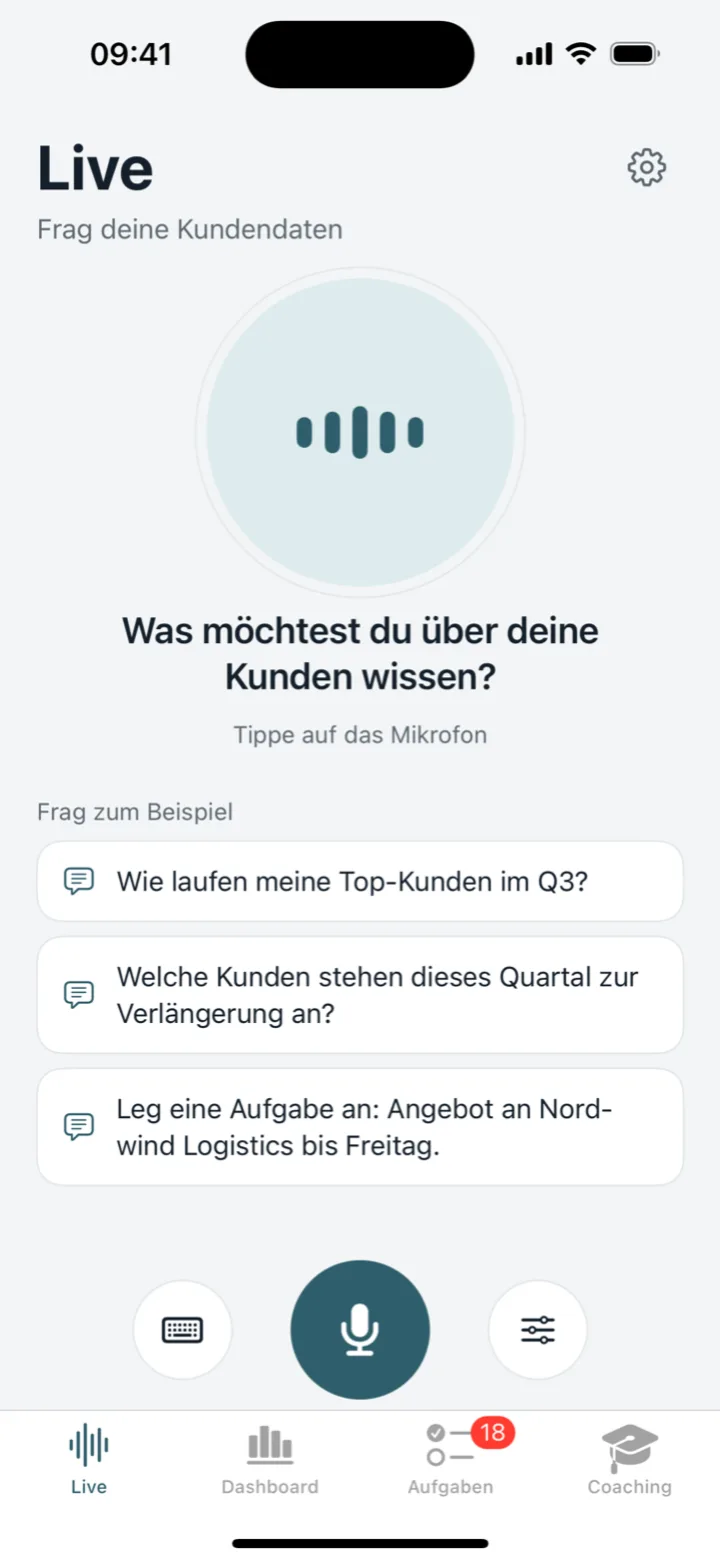
That is what we built the Sales Companion for: an iPhone app with CarPlay support that sits on the existing CRM as a voice interface.
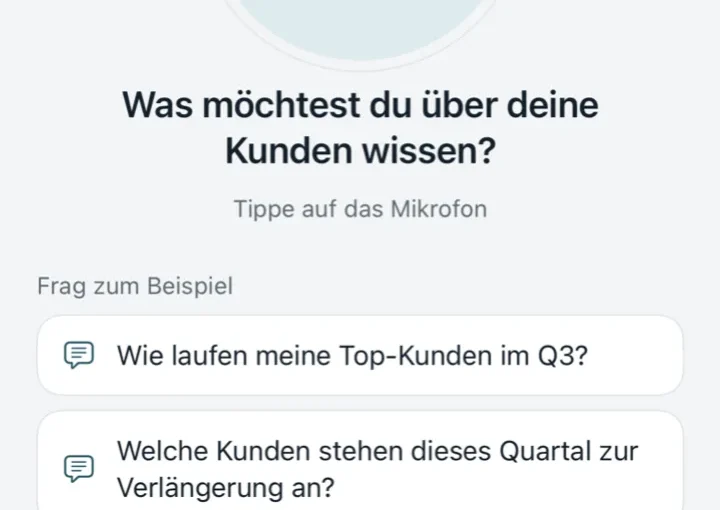
The Sales Companion voice view: ask a question instead of hunting for a form.
Worth stressing: it is not a new CRM. The data stays in Salesforce, SAP, Dynamics or Zoho, where it already lives. A layer goes on top, reaching those systems through adapters. No migration, no parallel system, no retraining for the teams who keep working at their desks in the tool they know.
Day to day, that means:
Briefing before the meeting — what matters about this customer, summarised on the way there.
Visit report after it — dictated rather than typed, with customer, contacts, topics and next steps.
Offer drafts — spoken quantities and prices become a draft, calculated exactly.
Analysis on demand — “Which customers ordered less this quarter than last?” in seconds, without waiting for a BI report.
One part surprised us with how well it lands: the same voice that knows your customers is also good for practice. A roleplay where the AI plays the counterpart, raises objections and pushes back — followed by a score per skill and concrete advice on what to work on. For new sales hires that beats any handbook.
Privacy is not a footnote
If you send customer conversations through a language model, you need to know where that data goes. Our infrastructure runs on European servers, GDPR and AI Act compliant. Personal data can be masked before a prompt reaches a model, and role-based access controls which teams can reach which data sources at all.
This is not a feature added later. For a system that records visit reports about real people, it is the precondition for being allowed to deploy it.
Frequently asked questions
Is the Sales Companion a new CRM?
No. The data stays in Salesforce, SAP, Dynamics or Zoho; the Sales Companion sits on top through adapters. No migration, no parallel system.
Does the AI calculate offer totals?
No. Numbers come from exact queries on the structured data, and the arithmetic is done by code. An estimated offer would be useless.
Where does the data live?
On European servers, GDPR and AI Act compliant. Personal data can be masked before a prompt reaches a model, and roles control access.
Can I try it?
Yes, on our Agentic CRM page: demo videos and the voice interface on sample sales data, no sign-up required.
See for yourself
On our Agentic CRM page you can watch the demo videos and try the voice interface directly — the public demo runs on sample sales data, no sign-up required.
The more interesting question was never whether the technology works. It is whether your sales team will use it. Our experience so far: when the input takes two minutes in the car park instead of twenty minutes in the evening, they do.
Design principles, performance, security, scaling and resilience — and why most agent platforms quietly fall apart on exactly those dimensions.
There’s a new family of AI agent runtimes that has emerged over the last few months, often grouped colloquially as “Claws” or sometimes “Clawz”: OpenClaw (formerly MoltBot, the personal experimentation framework), PaperClip (the agentic framework from Sebastian Küpers and the Serviceplan Group), Hermes-Agent, and our own HybridClaw. What connects them is an architectural break with the first wave of agent platforms: away from monolithic cluster setups, toward lean, locally executable runtimes that boot in seconds and can still be operated in production.
This article is about the architecture and design principles that make HybridClaw a lightweight runtime by deliberate choice — and why exactly that choice is what allows performance, security, scaling and resilience to be addressed cleanly in the first place.
Why “Lightweight” is the Right Model for Agents
The first generation of agent platforms borrowed its blueprint from classical microservice stacks: Kubernetes, service mesh, a dedicated cluster for the vector DB, another for the queue, a third for observability. That blueprint works well for hyperscalers and high-traffic consumer APIs. For agents, it’s the wrong model.
An agent is not a stateless request handler. An agent is closer to a long-running process that composes skills, invokes tools, queries models, drives browsers, and builds up a trajectory along the way — a trajectory that will later be needed for evals, replay and audit. If you press this kind of object into a classical microservice stack, you optimise the wrong axis: you get high availability for components that rarely fail, and at the same time no good answers to the questions that actually hurt in agent operations — “Which skill update broke performance last week?”, “Which tool call set the wrong VAT code?”, “Can we reproduce the run from Tuesday at 11:43?”
HybridClaw takes the opposite path. The runtime is a single Go-style binary that boots on a laptop in under a second. No cluster, no Kubernetes, no Helm chart as a prerequisite. Production deployments scale out to multiple worker processes, but that’s an option, not an entry fee. People who want to start with agents don’t need a DevOps team. People who want to run them in production have the same code path — just with more workers and a control plane on top.
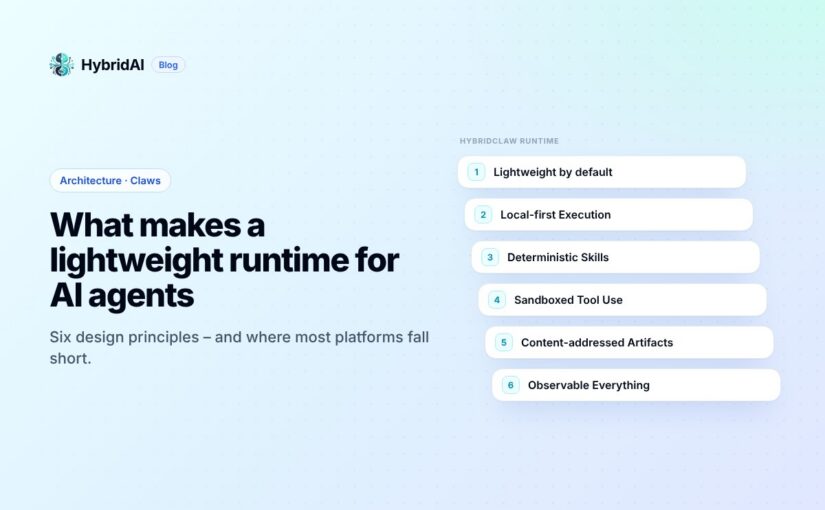
This architectural decision isn’t an aesthetic. It’s the foundation for six concrete design principles that shape every other property of the runtime.
The Six Design Principles in Detail
1. Lightweight by Default
Single binary, no cluster, no mandatory state store. The runtime itself holds no shared mutable state — coordination happens through the HybridAI control plane (queue + leader election) when a multi-node setup is run. Until then, SQLite or the local filesystem is enough.
2. Local-First Execution
Agents run where the data lives. Skills, tool calls and browser automation execute in the user’s environment by default. No cleartext data leaves the perimeter without explicit routing through the control plane. This isn’t only a GDPR feature — it’s also a latency argument. Anyone trying to route browser automation from a corporate data centre, through public cloud, onto a local ERP login screen has already lost.
3. Deterministic Skills
Skills are versioned, content-addressed manifests. Same input + same skill version = same trajectory. This is the point where many agent frameworks quietly cheat: they stitch together the system prompt at runtime from three templates, pull values out of environment variables, and hope it stays reproducible. It doesn’t. If skills aren’t deterministically addressable, evals are not meaningful and rollbacks are not safe. HybridClaw treats skills like code artefacts: signed, versioned, hash-identifiable.
4. Sandboxed Tool Use
Every tool runs in an isolated execution context with explicit capability grants. Browser automation, file access, shell commands — all gated by signed manifests and runtime policy. Default-deny. A skill that needs to send email doesn’t get shell access. A skill that analyses logs doesn’t reach the mail API. This sounds obvious, but in practice it’s the point where most agent demos fall apart in a real compliance review.
5. Content-Addressed Artifacts
Trajectories, skill outputs and audit records are content-addressed. Every entry gets a hash that uniquely identifies its content. Entries are chained — tampering is detectable. This makes traces reproducible, replayable, and forensically defensible. It’s the prerequisite for being able to prove to an auditor seven years from now what an agent did and when. Without this property, audit logs are just pretty tables with no legal weight.
6. Observable Everything
Every span, every tool call, every model invocation emits structured telemetry by default. Not as a plugin, not as an optional extension, not as “we’ll add it later”. Operators get dashboards for latency, cost-per-task, eval scores and safety incidents out of the box. Running an agent system without this telemetry is running on blind trust — and blind trust is not a strategy in an enterprise context.
Performance & Scaling: From the Laptop to the Worker Fleet
Scalability in agent runtimes is rarely a problem of raw request rate. An agent fleet with fifty agents running in parallel is not what makes classical web backends sweat. What makes it hard is that agents run long, make an unpredictable number of tool calls, and stream model responses rather than waiting for them. HybridClaw addresses this on five levels.
Agent-level concurrency. Every agent has its own task queue. A long-running tool call — say, a browser session waiting 90 seconds for a confirmation page — doesn’t block sibling agents. This is not a trivial pattern; many early agent frameworks had a global queue here and broke on exactly that.
Batched LLM calls. When several agents query the same model at the same time, in-flight prompts are batched where the provider allows it. This noticeably reduces cost and latency for high-volume workloads. With 100+ requests per minute to the same model, it’s not “nice to have” — it determines the token bill at the end of the month.
Multi-layer cache. Skill outputs, retrieval results and tool responses are cached at three levels: in-memory for the active task, on-disk for the agent process, and cross-worker on explicit opt-in. The last one is deliberately not the default — cache coherence between workers is one of the most common sources of bugs in distributed agent systems.
Worker scaling. Horizontal scaling happens through additional worker processes. Coordination runs through the HybridAI control plane (queue + leader election), not inside the runtime itself. This is the architectural decision that keeps the single-binary promise alive: the runtime knows nothing about other workers. It just does its job. The cluster concern lives one layer up, on purpose.
Streaming everywhere. Model outputs, tool results and channel responses stream end-to-end. There’s no waiting for a complete model completion before the next step starts. That doesn’t only reduce perceived latency in chat interfaces — it also lets downstream tools start working while the main model is still thinking.
Security: Assume Hostile Inputs
Agent platforms multiply the blast radius of every security flaw. A classical chatbot that gets jailbroken produces, at worst, embarrassing text. An agent that gets jailbroken can send emails, pay invoices, file tickets, write to databases. Anyone running agents seriously has to assume hostile inputs — both from outside (prompt injection in an incoming email) and from inside (a model that hallucinates and believes itself to be authorised).
HybridClaw stacks six security layers, all of them default-on:
Secrets vault. Tools never see raw credentials. Passwords, API keys and OAuth tokens are referenced by ID and resolved at runtime through the control plane. Audit logs and trajectories only ever contain the IDs, never the cleartext. Grepping the logs won’t yield secrets.
RBAC & capability grants. Permissions are granted per agent, per skill, per tool. Default-deny: whatever isn’t explicitly allowed is forbidden. That includes seemingly innocuous things like network access.
Sandboxed execution. File access, shell commands and browser automation run in isolated contexts with no host network access by default. A skill that parses PDFs doesn’t reach the internet — unless that specific capability is explicitly granted.
Signed skill manifests. Skills are verified against signed manifests before they run. No unsigned code paths in production. This blocks supply-chain attacks via tampered skill updates — a risk that is systematically underestimated in this space.
Human-in-the-loop gates. High-impact actions — money transfers, bulk deletes, outbound mail to customers — can require human approval. Configurable per skill, audit-logged. If you want an agent to wire ten thousand euros, that should require a second click.
Tamper-evident audit log. Every action is content-addressed and chained. Operators can prove what an agent did, when, under whose authority, with which skill version, against which input, producing which output, at what latency, at what cost. In the managed cloud, the log is additionally mirrored to an external append-only store and retained for seven years in an audit-grade format.
Resilience: Failure as the Default Case
This is one of the most important differences between demo agents and production agents: production agents fail. Models time out, tools return unexpected errors, networks partition, a vendor changes its API without notice. Anyone building agents only for the happy path is building toys.
HybridClaw treats failure as the default case, not an edge case. Concretely:
Failure Mode
Runtime Behaviour
Transient model error
Exponential backoff; on repeated failures, fall back to a configured alternative model.
Tool exception
Error is captured in the trajectory; agent can retry, choose a different tool, or escalate.
Worker crash
Task is requeued; idempotent skills resume from the last checkpoint. Non-idempotent skills surface a manual replay decision.
Bad skill version
Eval gate blocks deploy if regression score crosses a threshold. If it slips through anyway: rollback is a single command and content-addressed.
Dead-letter queue
Tasks that exceed the retry budget land in a DLQ for human inspection — never silently dropped.
Cost runaway
Per-agent budgets cap spend. Soft limits warn; hard limits stop new tasks until lifted manually.
The last entry is the one that tends to be missing from competing platforms — and the one that causes the most expensive damage. An agent stuck in a loop, racking up eight thousand euros in token costs over four hours, is not a theoretical scenario. We’ve seen it in real setups. Cost-runaway protection belongs on the same tier as security and audit, not in some “premium” plan.
Self-Hosted Runtime, Managed Control Plane — or Both
Architecturally, HybridClaw separates two layers cleanly: the runtime (open source, lightweight, self-hostable) and the control plane (managed, EU-hosted, with compliance features built in).
The runtime handles agent execution, skill manifests, tool sandboxing, browser automation, local trajectory capture, and the multi-channel adapters (Discord, Teams, WhatsApp, email, web, terminal). It’s openly available on GitHub, runs locally, and can be operated on your own infrastructure.
The control plane handles RAG and memory, the company brain, RBAC, the secrets vault, the audit log, observability dashboards, skill evals and deploy gates, budget controls, EU hosting, and GDPR/AI Act compliance. It lives on hybridai.one and is operated by us.
Both layers are independently deployable. The most common configurations we see with customers:
Fully managed cloud. Fastest path to production, operations handled by us, EU hosting on Hetzner.
Self-hosted runtime + managed control plane. Data control at the customer perimeter, but no need to build your own audit storage or eval setup.
Fully self-hosted. Maximum control, everything on your own infrastructure, local models via Ollama or vLLM, up to 80% token savings compared to cloud LLMs.
Hybrid deployment. Managed-cloud agents delegate sensitive tasks to self-hosted agents. Works over agent-to-agent messaging.
Important: skills and memory are portable between deployments. Starting in the managed cloud and migrating later doesn’t mean rebuilding from scratch.
Conclusion: Lightweight Is a Choice, Not a Shortcoming
When people hear “lightweight runtime”, they sometimes hear “toy” or “not enterprise-grade”. That would be a misreading. Lightweight here means: no complexity that isn’t justified by the use case. An agent doesn’t need a Kubernetes cluster to classify invoices. An agent doesn’t need twelve microservices to prepare an SAP posting. What it needs is a clean skill model, signed manifests, isolated tools, a tamper-evident audit log, and telemetry that shows whether it’s doing its job.
That is exactly what HybridClaw is. An open-source runtime that boots in under a second, ships as a single binary, and still brings every property you need to run in regulated, production-grade environments. The control plane on top is optional — but for anyone who doesn’t want to build GDPR compliance, seven-year audit retention and EU hosting themselves, it’s the substantially calmer route.
For the architecture in detail: hybridclaw.io/architecture. To get hands-on: GitHub for self-hosted, hybridai.one for the managed cloud. There’s a live demo at re:publica 26 in Berlin, where we’ll have a HybridClaw agent write a book on stage. Let’s see how far it gets.
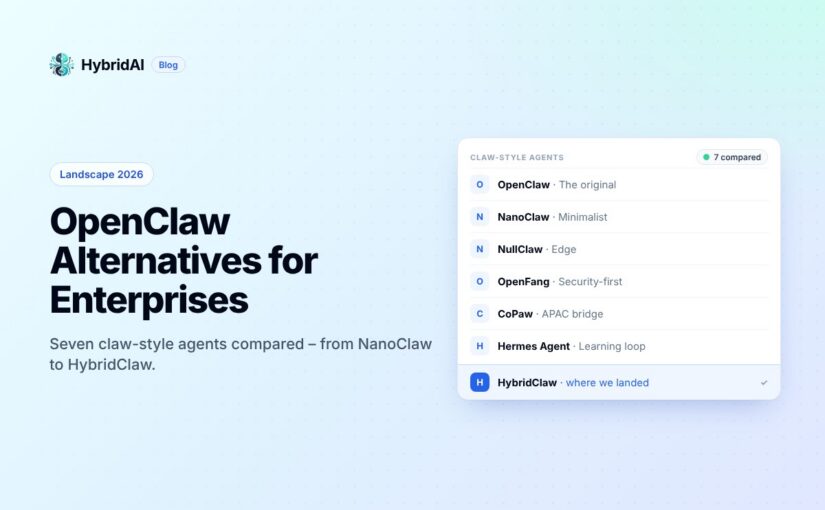
Let’s be honest: OpenClaw changed everything. When it first shipped, the idea of a single AI assistant that lives across all your messaging channels felt like science fiction. Today it’s table stakes. But as more teams move from “let’s try this” to “let’s deploy this for real,” the cracks in the original are showing — and a new generation of claw-like agents is stepping in to fill the gaps.
We’ve been building in this space for a while now, and we talk to enterprise teams every week who are evaluating their options. Here’s what the landscape actually looks like in 2026, and why we think it matters.
The Original: OpenClaw
You can’t have this conversation without starting here. OpenClaw is the most mature project in the space — 23+ channel adapters, a skills marketplace (ClawHub), voice wake mode, browser control, cron scheduling, Canvas with A2UI. It’s the kitchen sink, and for many teams, that’s exactly what they want.
But enterprise teams keep running into the same friction points. The ~500 MB memory footprint and 6-second startup feel heavy when you’re deploying hundreds of instances. The security model is application-level — permission checks in code, not actual OS isolation. And at ~400 source files with 53 configuration surfaces, onboarding new engineers takes longer than anyone admits.
If your team has the ops muscle and wants maximum channel coverage out of the box, OpenClaw is still a defensible choice. But if you’re evaluating with fresh eyes, keep reading.
NanoClaw: The Minimalist Thesis
NanoClaw took the opposite bet: what if the entire codebase was small enough that one engineer could understand it in an afternoon? It’s a single Node.js process, a handful of files, and true container isolation — not permission checks, but actual Docker or Apple Container boundaries per group.
The Agent Swarms feature is genuinely novel. NanoClaw was the first personal assistant framework to ship it, and it unlocks parallel task execution patterns that larger tools are still catching up on. The trade-off is ecosystem breadth — fewer channels, fewer integrations, and customization means changing code, not toggling config flags. For teams that want deep control and can live with five solid channels instead of twenty-three, NanoClaw punches well above its weight.
NullClaw: The Edge Play
This one is wild. NullClaw compiles to a 678 KB static Zig binary, runs in under 1 MB of RAM, and cold-starts in less than 2 milliseconds. On paper, those numbers shouldn’t be possible for something that supports 50+ LLM providers and 19 channels.
The architecture is vtable-driven — every component (providers, channels, tools, memory) is a swappable interface. You can compile exactly the feature set you need. For edge deployments, embedded devices, or that $5 ARM board sitting in a closet, nothing else comes close. The catch is Zig itself: smaller talent pool, steeper onboarding, and the project is still pre-1.0. Enterprise teams running fleets of lightweight agents on constrained hardware should absolutely evaluate this. Everyone else can admire it from a distance.
OpenFang: The Security-First Heavyweight
If NullClaw is the lightweight champion, OpenFang is the enterprise heavyweight. Written in Rust across 14 crates and 137K lines of code, it positions itself as an “Agent Operating System” — and the framing is earned. Sixteen distinct security layers including Merkle audit trails, taint tracking, Ed25519 signing, and SSRF protection. WASM-metered sandboxing for tool execution. Forty channel adapters.
The killer feature is Hands — pre-built autonomous capability packages for lead generation, OSINT collection, video processing, research, and social media management. These run 24/7 without user prompting, which is exactly what enterprise operations teams want. Cold start under 200 ms, 40 MB memory, 32 MB binary. The downside: it’s Rust, it’s complex, and it’s v0.3.30. But for organizations where audit trail and security posture are non-negotiable, OpenFang is the answer today.
CoPaw: The APAC Bridge
CoPaw comes from AgentScope and targets a gap that Western-built tools consistently miss: first-class support for DingTalk, Feishu, and QQ alongside the usual Discord/Slack/Telegram stack. Desktop installers for Windows and macOS, a web console for configuration, and Python-based skill authoring make it the most accessible option for non-developer users.
For enterprises with significant APAC operations — especially teams in China — CoPaw solves a localization problem that no other tool in this list even attempts seriously. The trade-off is the usual Python story: heavier runtime, less security hardening, more cloud dependency.
Hermes Agent: The Learning Loop
Nous Research’s Hermes Agent is the only project here that genuinely improves itself during use. It creates skills from experience, refines them over time, searches past conversations, and builds persistent user profiles. The closed learning loop — where the agent curates its own memory with periodic nudges — is architecturally distinct from everything else in this space.
For research teams and organizations betting on long-horizon agent deployments where accumulated knowledge is the moat, Hermes is uniquely compelling. It’s also the most research-oriented tool here, with built-in support for trajectory generation and RL environments. Less polished for day-one enterprise deployment, but the trajectory (pun intended) is clear.
HybridClaw: Where We Landed
We built HybridClaw because we kept seeing the same gap. Enterprise teams wanted OpenClaw’s feature depth but with actual security isolation, EU-stack compatibility, and GDPR-aligned data handling — without the ops burden of running Rust or Zig in production.
HybridClaw runs as a Node.js gateway with Docker-sandboxed tool execution. RAG-powered retrieval with document-grounded responses. Structured audit trails with hash-chain verification. Bundled office skills — PDF, XLSX, DOCX, PPTX — that handle the kind of document workflows enterprises actually need, not just chat. MCP integration for extensibility. Local model support via LM Studio, Ollama, or vLLM for air-gapped deployments. A built-in admin console with dashboard, session management, model configuration, and audit views.
What we think makes the difference: HybridClaw treats security and compliance as first-class architectural decisions, not afterthoughts bolted on top. Container isolation by default. Credentials separated from config. An onboarding flow that requires explicit trust model acceptance before anything runs. And all of it in TypeScript — which means your team can actually audit, extend, and maintain it without hiring Zig or Rust specialists.
Is it the smallest? No, that’s NullClaw. The most channels? No, OpenFang. The most autonomous? Hermes has that covered. But for European enterprises that need a production-ready agent with real security, document workflows, and a codebase their existing team can own — that’s the gap we built for.
The Takeaway
The “claw-like agent” space in 2026 is no longer a one-horse race. OpenClaw set the template, but the next generation is fragmenting along clear lines: minimalism (NanoClaw, NullClaw), security-first (OpenFang, HybridClaw), regional fit (CoPaw), and self-improvement (Hermes). The right choice depends on your constraints — not on who shipped first.
Pick the tool that matches your actual deployment reality, not the one with the longest feature list.
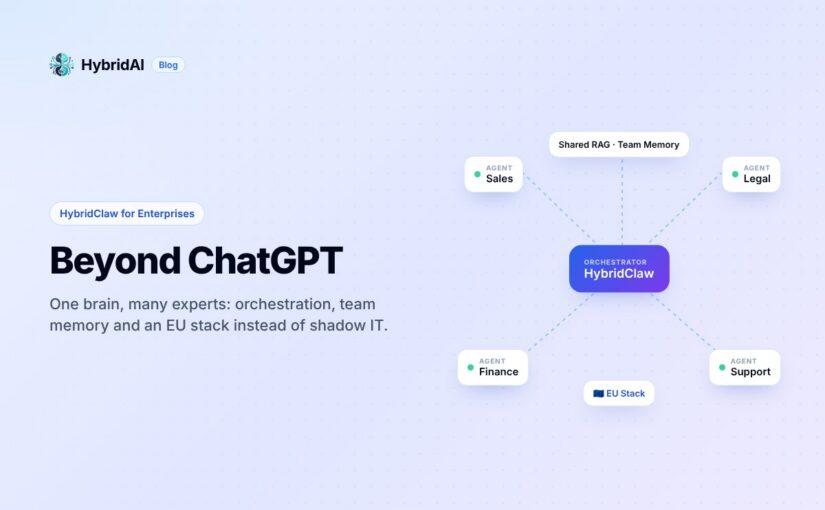
In today’s business landscape, we observe a critical paradox: while individual employees achieve impressive efficiency gains using isolated tools like ChatGPT, the overall systemic performance of organizations remains stagnant. The result is an uncontrolled shadow IT environment that not only poses a significant risk to data sovereignty but also isolates valuable knowledge within private chat windows.
We are leaving the era of mere “AI experimentation” behind and entering the phase of industrial-grade AI. The decisive step moves away from pure personal productivity—as offered by OpenClaw (formerly MoltBot) in private use—toward a resilient enterprise infrastructure powered by HybridAI. Companies that still rely on simple chatbots are missing out on the potential of scalable operational excellence.
So why is a standard interface no longer sufficient for businesses? The answer lies in the transformation from isolated text generation to orchestrated, secure, and collective intelligence.
2. Takeaway 1: The Power of Orchestration – One Brain, Many Experts
A major obstacle to strategic scaling is dependence on a single provider. HybridAI solves this through multi-model orchestration. Instead of relying on a single model, the system leverages a portfolio of more than 10 leading LLMs—including GPT-5, Claude, Gemini 3, Mistral, DeepSeek, and specialized models like Nano-Banana for image generation.
At its core is Intelligent Task Routing: the system autonomously recognizes the nature of a task and delegates it to the most capable expert. While Claude designs complex coding structures, GPT-5 handles deep research, Gemini 3 excels at high-speed queries, and Nano-Banana visualizes concepts.
Strategically, this ensures full vendor independence: companies are no longer tied to the fate of a single provider but remain flexible and future-proof.
“Multi-model orchestration, shared RAG for departments, specialized tools, and maximum data security. Give your teams the most powerful AI assistance with full control.”
3. Takeaway 2: From Individuals to Collective Intelligence – Shared RAG and Team Memory
In traditional setups, AI acts as a “lone operator,” starting from zero with every interaction. HybridAI transforms this into a long-term digital memory for the entire organization. Knowledge transfer is revolutionized through two mechanisms:
Shared RAG (Retrieval-Augmented Generation): Departments or project teams work with shared knowledge bases. SOPs, specific guidelines, and technical documentation are centrally provided, allowing AI to respond based on verified company data.
Team Memory: The AI continuously learns from interactions across the entire collective. This shared intelligence ensures that valuable insights are not lost when a browser tab is closed but persist as a strategic asset for the entire department.
4. Takeaway 3: Sovereignty by Default – The EU Stack Guarantee
For compliance leaders, data security is the foundation of any AI strategy. HybridAI offers an architecture where sovereignty is not an option—it is the default.
The system is fully GDPR-compliant, entirely hosted in the EU, and already aligned with the upcoming AI Act.
For organizations with the highest security requirements, self-hosting via vLLM on their own infrastructure is also available. A key technical enabler is the multi-layer security concept: an integrated filter detects sensitive data (PII – Personally Identifiable Information) and automatically masks it before processing.
Combined with a complete audit trail that documents every action, the system meets even the most stringent regulatory requirements.
The paradigm shift of HybridAI lies in its ability to act. We are no longer talking about simple text generators, but about AI agents that can autonomously access browsers, APIs, databases, and ERP systems. These agents don’t just perform tasks—they complete them.
Specialized tools unlock their full potential, particularly in professional departments:
BI Service: Enables business intelligence via text-to-SQL. Employees can perform complex data queries in natural language without needing SQL knowledge.
Tax Classification: Automates highly specific processes such as assigning VAT codes, Incoterms 2020, and HS codes for global trade.
Coding Agent: Supports software teams with automated code reviews and testing directly within workflows—optionally secured with locally hosted models for maximum IP protection.
6. Takeaway 5: The Visual Identity of Hybrid AI
The HybridClaw logo is a visual metaphor for this new form of collaboration. The organic lines of the jellyfish represent fluid human intelligence and adaptability. These merge with mechanical claws and circuitry, symbolizing machine precision and connectivity.
A central element is the data cubes, manipulated by the mechanical claws. They represent the raw informational building blocks of an enterprise. The symbolism is clear: AI serves as a precise tool to structure unorganized data and transform it into valuable knowledge through the organization’s organic intelligence.
It is the perfect fusion of biological adaptability and technological power.
7. Conclusion: The Future of the Augmented Workforce
OpenClaw and the HybridAI infrastructure mark the end of isolated AI experimentation. This is not just another tool in the software stack—it is the operating system for the collective intelligence of modern enterprises.
In a world where information is the most valuable resource, the quality of orchestration determines market success.
Is your company still stuck in “chat mode,” or are you already leveraging the full potential of an orchestrated AI workforce for your strategic transformation?
Over the past few months, we’ve witnessed a real boom in AI applications – from ChatGPT to Copilot and specialized enterprise solutions. A question that keeps coming up: How can I intelligently connect my existing Business Intelligence data with AI?
The answer is simpler said than done. While AI excels at handling unstructured text, structured databases present a unique challenge.
The Problem: Structured Data Meets AI
Why RAG Isn’t the Solution
The classic RAG approach (Retrieval Augmented Generation) works brilliantly for documents, PDFs, or knowledge bases. Text is converted into vectors and searched semantically.
But: BI data in SQL databases is structured. It thrives on:
Precise aggregations (SUM, AVG, COUNT)
Complex JOINs across multiple tables
WHERE conditions with exact values
GROUP BY for groupings
A vector search over your revenue table will never match the precision of a SQL query. RAG is simply the wrong tool here.
Why Simple SQL Tool Calls Are Too Limited
The next thought: “Let’s just give the LLM an SQL tool!”
The problem with that:
Lack of context continuity: For every question, the model must re-understand the entire schema context
No iteration: Complex analyses require multiple cascading queries
Reasoning overhead: The conversational model must simultaneously write SQL AND provide clever answers
Prompt collision: SQL syntax and natural conversation compete for context space
A model that’s supposed to do both – SQL and conversation – won’t do either particularly well.
The Solution: A Two-Layer Approach
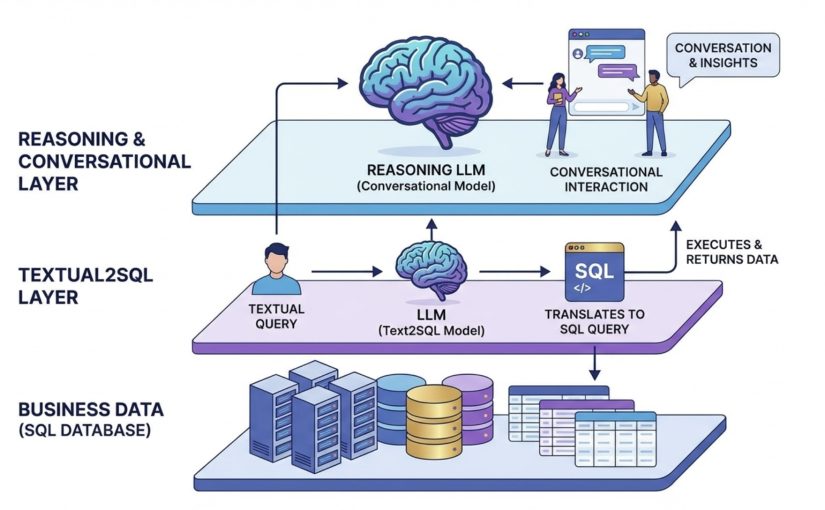
The elegant solution lies in specialization through layering. Instead of having one model do everything, we split the work between two specialized LLMs:
Layer 1: Text2SQL – The Data Translator
The first LLM has a single task: convert textual queries into precise SQL.
Benefits of this specialization:
Focuses solely on schema understanding and SQL syntax
Can be fed with extensive database context
No “distraction” from conversational requirements
Smaller, faster model possible (e.g., GPT-3.5, Claude Haiku)
Workflow:
User asks: “How much revenue did we make in Q4?”
Text2SQL LLM translates to: SELECT SUM(revenue) FROM sales WHERE quarter = 4
Query is executed, data comes back
Layer 2: Reasoning LLM – The Conversation Partner
The second, higher-level LLM is your intelligent analyst. It:
Conducts the conversation with the user
Decides what data is needed
Calls the Text2SQL LLM as a tool
Interprets the data and draws conclusions
Asks follow-up questions and conducts multi-turn analyses
Example Dialog:
User: “How is our revenue developing?”
Reasoning LLM thinks: → Need revenue data for recent quarters → Calls Text2SQL: “Revenue per quarter last 12 months” → Receives data: Q1: 1.2M, Q2: 1.5M, Q3: 1.8M, Q4: 2.1M
Reasoning LLM responds: “Your revenue shows a clear upward trend with +75% growth over the last 4 quarters. Q4 was particularly strong with +16% vs Q3.”
User: “What’s driving that?”
Reasoning LLM thinks: → Need breakdown by product category Q4 → Calls Text2SQL → Analyzes and responds: “The main drivers were…”
Why This Approach Is Superior
1. Separation of Concerns
Each LLM does what it does best:
Text2SQL: Precise SQL generation
Reasoning: Intelligent analysis and conversation
2. Better Performance
Smaller, faster models possible for Text2SQL
Less context-switching
Parallel optimization of both layers
3. Higher Quality
Text2SQL can be trained with detailed schema knowledge
Reasoning LLM focuses on insights, not syntax
Less “prompt pollution”
4. Easier Maintenance
Schema changes? Only adjust Text2SQL
Improve conversational style? Only adjust reasoning prompts
Clear responsibilities
5. Better Error Handling
SQL errors can be caught by the Text2SQL layer
Reasoning LLM can ask alternative questions
Graceful degradation possible
Implementation in Practice
At HybridAI, we implement exactly this approach for our clients:
Text2SQL Layer: A specialized model familiarized with your database schema
Reasoning Layer: Claude or GPT-4 for natural conversations about your data
Security: Row-level security and access control at DB level
Caching: Frequent queries are cached for faster responses
The result: Your employees can speak with your BI data in natural language – precisely, quickly, and intelligently.
Conclusion
Connecting AI with structured BI data is not a trivial task. Neither RAG nor simple SQL tools are sufficient.
The solution lies in intelligent division of labor: A specialized Text2SQL LLM translates queries into precise SQL, while a higher-level Reasoning LLM conducts the conversation and generates insights.
This two-layer approach combines the best of both worlds: The precision of structured queries with the flexibility of natural conversation.
Want to enhance your BI data with AI? At HybridAI, we support you in implementing intelligent data analysis solutions. Contact us for a non-binding conversation.
Everyone’s talking about AI in accounting now. The consultants have their slides ready. The vendors are rebranding their invoice OCR tools. LinkedIn is full of posts about “How I automated my finance tasks – comment FINANCE to get my n8n workflow.” Wrappers everywhere.
Here’s my honest take after working on the technical AI side of this stuff for a while: AI will absolutely change accounting. But not in the way most people think, and probably not as fast as the headlines suggest.
The terminology mess
Let’s start with the basics, because the language around this is a disaster. When people say “AI in accounting,” they could mean any of the following:
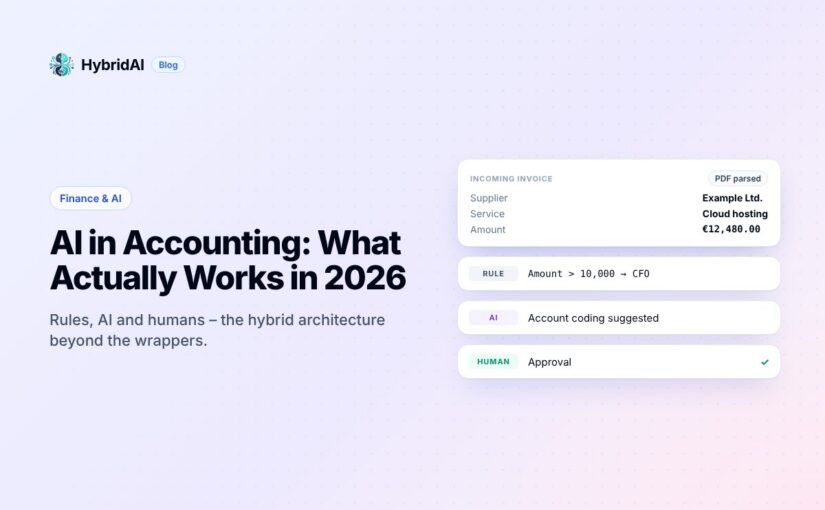
Rule-based automation: If invoice amount > 10,000, route to CFO. If “Intra-community supply under § 4 1b”, then “VAT_00”. Not AI. Just code with a marketing budget.
Machine learning classifiers: Trained models that categorize transactions based on patterns. These are actually useful and have been around for years. But they often don’t generalize well and are hard to keep up to date, because often they’re a black box.
OCR and document extraction: Reading invoices and pulling out vendor names, amounts, dates. This is common practice now. And in some instances it actually works.
Large Language Models: Our favorite brand new toy. GPT, Claude, Gemini. Can understand context, interpret messy inputs, handle edge cases. But also: can hallucinate numbers with absolute confidence.
Most “AI accounting” products today are really just ML classifiers with an LLM-powered chatbot stapled on top. Which is fine, but let’s be honest about what we’re dealing with.
Where AI already works today
Behind all the marketing talk, there are real wins happening right now:
Document capture and extraction. Modern systems can read invoices in any format, any language, any level of scan quality. The combination of vision models and LLMs has basically solved this problem. You still need human review for edge cases, but 80-90% straight-through processing is achievable. And if you get an invoice in a new format, it still works. Because AI.
Transaction categorization. For standard cases, ML models are excellent at learning your chart of accounts and applying it consistently. They don’t get tired on Friday afternoons. They don’t have “creative” interpretations of cost centers. Also: don’t forget that AI doesn’t necessarily means LLMs. We also have an awesome family of sub 1b parameter encoder only models that are wonderful at classification.
Anomaly detection. Spotting duplicate invoices, unusual amounts, vendors that suddenly changed bank details. Pattern recognition at scale is exactly what ML does well. This is genuinely useful for fraud prevention and audit prep.
Natural language queries. “Show me all marketing expenses over 50k last quarter” without writing SQL. This works now. It’s not magic, but looks like magic and really saves time. Why not chat with your business data 😉
The common thread? These are all tasks where being approximately right most of the time is valuable, and where humans can easily verify the output.
Where things get interesting (and dangerous)
Now for the hard part.
The moment you need AI to make a decision that has legal or tax implications, everything changes. Consider VAT determination on an incoming invoice. Sounds simple: it’s 19%, right?
Except when it’s not. Is the supplier in another EU country? Is this a service or a good? Does reverse charge apply? Is it construction-related (§13b in Germany)? Is the supplier even VAT-registered? Is it a triangular trade? Is there a pandemic with special vat rates?
I’ve written about this specific problem with tax codes in SAP before. The short version: there are dozens of edge cases, and getting it wrong means audit findings, back taxes, and possibly fraud allegations.
Here’s the uncomfortable truth: LLMs are very good at explaining what reverse charge is. In academic voice or as a sonnet. But they’re dangerously unreliable at determining whether a specific invoice should use it. The difference matters.
The hallucination problem is real. An LLM will confidently tell you that this invoice clearly qualifies for intra-community supply treatment. It might even cite the relevant EU directive. It might also be completely wrong, because it didn’t notice the supplier has a German VAT ID, or because the goods never actually left the country. I ran a couple of examples through different LLMs – and they were very opinionated about certain things. But not necessarily right. So right now, we’re creating a VATBench to get a better view of this.
When Claude or GPT makes a mistake in a creative writing task, you get a weird sentence. When it makes a mistake in tax determination, you get a six-figure assessment in your next audit.
The hybrid AI architecture that actually works
So where does this leave us? Not with “AI bad, humans good.” The answer is architectural. A pattern that really works magic combines three things:
LLMs for interpretation. Let the language model read the invoice, extract the relevant facts, classify the transaction type, identify the supplier’s jurisdiction. This is what they’re good at – information extraction!
Structured rules for decisions. Tax law is not creative. It’s a decision tree with many branches but clear logic. Once you have the facts, applying the rules should be deterministic. No creativity needed. No hallucination possible.
Transparent audit trails. Every decision needs to document why it was made. Which invoice fields were extracted. How the supplier was classified. Which rule determined the tax code. When the auditor asks, you need answers.
The key insight: don’t ask the LLM what the tax code should be. Ask it to extract the facts, then apply your rules. It’s not half as sexy as “our AI automatically handles everything.” But it works.
What this means for CFO offices and finance teams
A few practical conclusions:
You’re not getting replaced. The “AI will automate away accounting” takes are mostly written by people who’ve never closed a month-end.
Your job is changing. Less data entry, more oversight. Less manual matching, more exception handling. Less typing, more thinking. If you’re spending 60% of your time on tasks that could be automated, you should definitely talk AI.
You need to understand the tools. Not how to build an LLM from scratch (even this is super fun to do). But how they work, where they fail, what they can and can’t do. The finance leaders who thrive will be the ones who can evaluate AI vendors with real technical understanding.
Start with contained problems. Don’t try to “AI-enable the entire finance function.” Pick one painful process with clear success criteria. Invoice capture. Expense categorization. Intercompany matching. Get that working, learn from it, then expand.
The bottom line on AI in accounting
AI in accounting is real, useful, and overhyped all at the same time. The technology works for information extraction, pattern matching, and natural language interfaces. It doesn’t work—not safely—for unsupervised decision-making on anything with legal consequences.
To provide the best experiences, we use technologies like cookies to store and/or access device information. Consenting to these technologies will allow us to process data such as browsing behavior or unique IDs on this site. Not consenting or withdrawing consent, may adversely affect certain features and functions.
Functional
Always active
The technical storage or access is strictly necessary for the legitimate purpose of enabling the use of a specific service explicitly requested by the subscriber or user, or for the sole purpose of carrying out the transmission of a communication over an electronic communications network.
Preferences
The technical storage or access is necessary for the legitimate purpose of storing preferences that are not requested by the subscriber or user.
Statistics
The technical storage or access that is used exclusively for statistical purposes.The technical storage or access that is used exclusively for anonymous statistical purposes. Without a subpoena, voluntary compliance on the part of your Internet Service Provider, or additional records from a third party, information stored or retrieved for this purpose alone cannot usually be used to identify you.
Marketing
The technical storage or access is required to create user profiles to send advertising, or to track the user on a website or across several websites for similar marketing purposes.