
Every company running a CRM hears the same complaint from sales: “This system costs me more time than it gives back.” The usual responses are training, mandatory fields, reminder emails, and eventually pressure from management. They rarely work, and the reason is structural.
Why CRM records are incomplete
A field rep has a forty-minute meeting at a customer site. Inside it: a quantity, a reservation about price, the news that the actual decision-maker just changed, a complaint about the last delivery, and a sense of how likely the deal is to close.
How much of that reaches the CRM depends on whether that person — two meetings later, on a train, or at home in the evening — can summon the energy to fill in eleven form fields. Usually one sentence makes it. Sometimes nothing does.
This is not a discipline problem. It is an interface problem. The conversation is spoken language: unstructured, full of context. The CRM expects form fields. Between the two sits a translation job someone has to do by hand — and it falls to the person whose time is the most expensive in the company.
Most of the AI conversation over the past few years has focused on the opposite direction: better analysis of the data that is already there. Dashboards, forecasts, lead scoring. None of that is wrong, but it treats the symptom. If half of what happens in the market never enters the system, even the best model on top of it is analysing the gaps.
Why realtime voice is different from chat
Voice control for business software has existed for twenty years and was almost always disappointing. What changed is not speech recognition — that was already good enough — but what happens between recognition and execution.
A realtime voice model does not listen and transcribe. It understands a spoken paragraph, identifies several distinct facts inside it, routes them to different target structures, and asks when something is missing. So
“Just left Müller GmbH. They want 200 units at the Q3 price, decision by end of month — I’d put it at 70 percent.”
becomes three separate records: a visit report, an offer draft, and a deal assessment. Each lands where it belongs, with the right fields filled in.
Timing is what makes it work. This happens in the car park, two minutes after the meeting, while the details are still sharp — not in the evening, when the memory has worn down and the motivation is gone.
The second difference from chat is that it is hands-free. A rep driving between appointments cannot type, but can talk. And that window — between two meetings — is exactly when people are most willing to deal with something that otherwise gets postponed indefinitely.
Reading and writing belong together
Dictation alone would only be half a solution. It gets interesting when the same voice also answers questions.
“What do I need to know about this customer?” on the drive over — and the answer covers open opportunities, recent orders, notes from the last visit, and the relevant emails from recent weeks. Same data as on the desktop, through an interface that works in a car.
Technically these are two different jobs. Questions about revenue, quantities and pipeline have to become exact queries over structured data — nothing may be estimated, numbers are numbers. Questions about background, conversation history or product detail have to run semantically over unstructured documents: meeting notes, emails, spec sheets, contracts.
We deliberately split this into two paths — text-to-SQL for the figures, semantic search for the story behind them — and let a third model combine and explain the results. The arithmetic is never done by the language model, always by code. An offer whose total an LLM “estimated” would be worthless.
What this looks like in practice: Sales Companion
That is what we built the Sales Companion for: an iPhone app with CarPlay support that sits on the existing CRM as a voice interface.
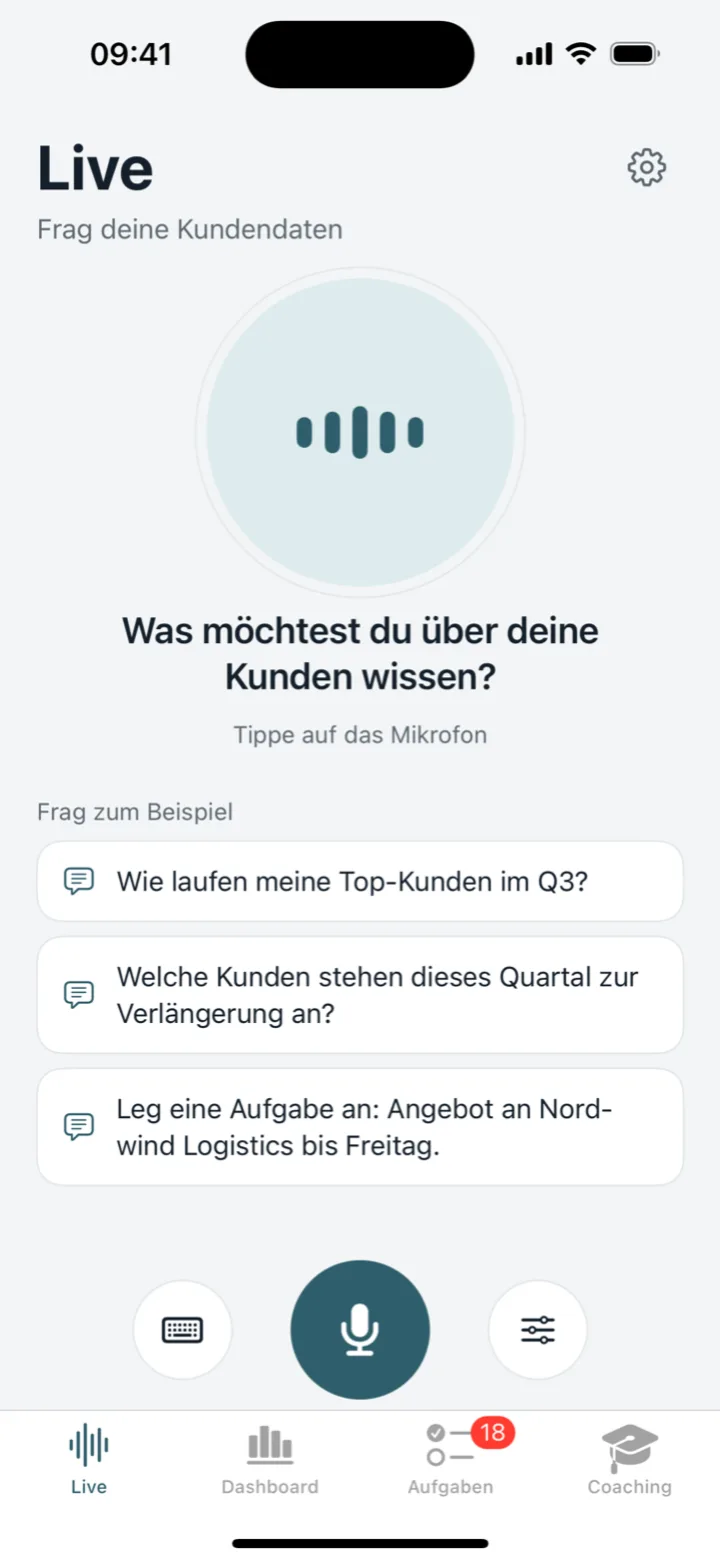
Worth stressing: it is not a new CRM. The data stays in Salesforce, SAP, Dynamics or Zoho, where it already lives. A layer goes on top, reaching those systems through adapters. No migration, no parallel system, no retraining for the teams who keep working at their desks in the tool they know.
Day to day, that means:
- Briefing before the meeting — what matters about this customer, summarised on the way there.
- Visit report after it — dictated rather than typed, with customer, contacts, topics and next steps.
- Offer drafts — spoken quantities and prices become a draft, calculated exactly.
- Analysis on demand — “Which customers ordered less this quarter than last?” in seconds, without waiting for a BI report.
One part surprised us with how well it lands: the same voice that knows your customers is also good for practice. A roleplay where the AI plays the counterpart, raises objections and pushes back — followed by a score per skill and concrete advice on what to work on. For new sales hires that beats any handbook.
Privacy is not a footnote
If you send customer conversations through a language model, you need to know where that data goes. Our infrastructure runs on European servers, GDPR and AI Act compliant. Personal data can be masked before a prompt reaches a model, and role-based access controls which teams can reach which data sources at all.
This is not a feature added later. For a system that records visit reports about real people, it is the precondition for being allowed to deploy it.
See for yourself
On our Agentic CRM page you can watch the demo videos and try the voice interface directly — the public demo runs on sample sales data, no sign-up required.
The more interesting question was never whether the technology works. It is whether your sales team will use it. Our experience so far: when the input takes two minutes in the car park instead of twenty minutes in the evening, they do.