Evaluation-Set for every Customer

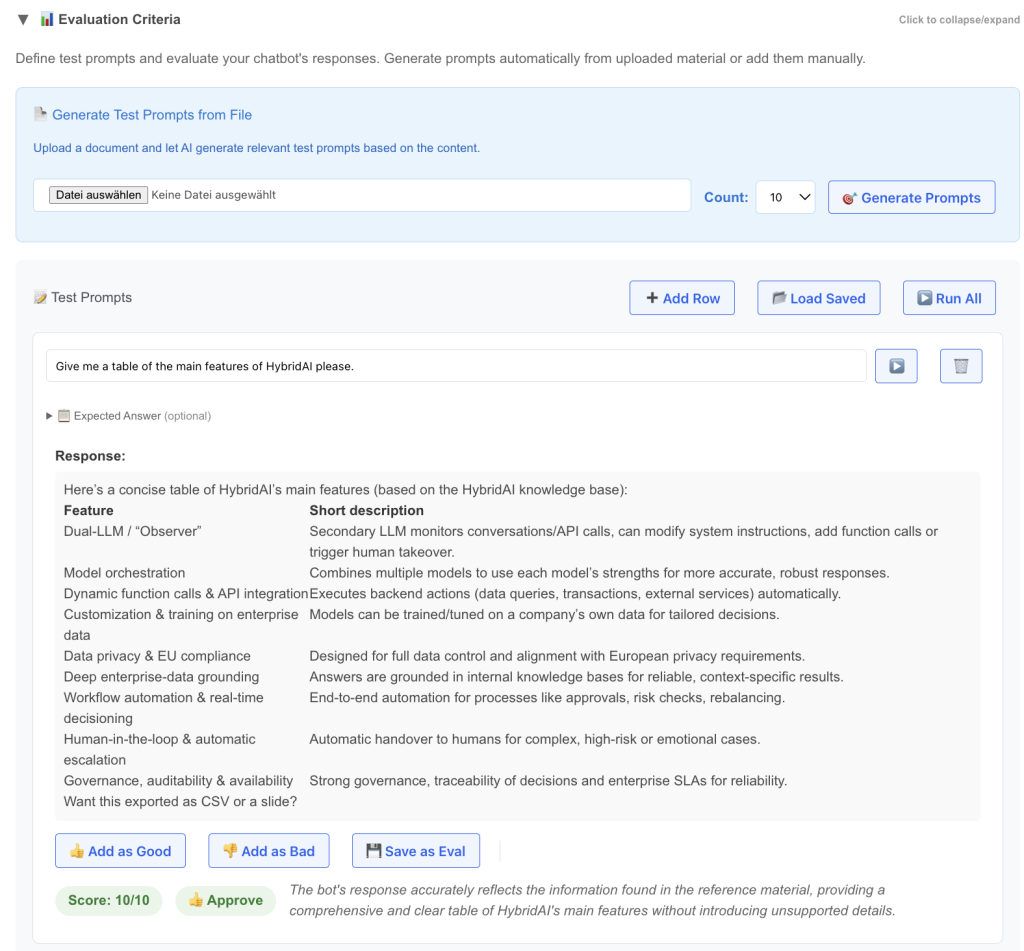
Today we launched a new feature in the Prompt-Tuning-Clinic – the “Evaluation Criteria” Section.

It’s one of the most annoying things in AI to hunt for the question whether a custom configured AI (ChatBot, Agent, Automation) is doing well or not. In most cases both suppliers and customers are treating it like this:

“Yesterday i did run this prompt against it, and it looked really well, good progress!” – or – “My boss asked it to do x and it gave a total wrong answer, we have to redo the whole thing!”

Its an inherent problem of AI to some extent, for one because of the universal capability of these systems and the fact that you can ask practically everything and will always get an answer. And – due to the non-deterministic architecture and functioning of these systems it is very hard to define what it is doing and what not.

We were a bit tired of this, and so we thought – why are we reading LLMarena (btw – we launched german LLM-Arena recently, try it here) and other rankings of new AI models every second day and dont apply similar mechanisms to our customer installations?

This is exactly what this new feature brings:

  • define a couple of test-prompts (you can upload some treatment material like your API-Documentation or an md-file of the Website and let the AI make proposals for test-prompts)
  • run these prompts against the current configuration of the bot
  • Evaluate them (can also be done with an LLM automatically)
  • Define correct answers for edge cases
  • Save those prompts that are important permanently
  • Give them thumbs up/down to create cases for Fine-Tuning and DSPy
  • Run them all to get a quality ranking

Once this is set up the game is changing drastically, because now we (both supplier and customer) do have a well defined test-set of intended behavior that can be run automatically.

This is not only good for initial setup of a system, but also for Improvements, Model-Updates, new Settings etc.

And: as we are also offering fine-tuning for our models and have integrated DSPy as automated Prompt-Tuning tool you can create training-data for these while creating your Evaluation-Set as well – just thumbs up/down on the answer creates an entry in the test-database for later.

Sign up for a free Account and try it out!

Business Intelligence in the AI Era in 2026: Opportunities, Risks, and the Architecture Behind It

Let’s be honest: Does your company have all business-relevant information available at the push of a button? Or is it also stuck in various data silos, largely unconnected – the ERP here, the CRM there, plus Excel spreadsheets on personal drives and strategy documents somewhere in the cloud?

If you’re nodding right now, you’re in good company. I regularly speak with CEOs and finance leaders, and the picture is almost always the same: The data would be there. But bringing it together to answer a specific question takes days – if anyone can do it at all.

Why This Is Becoming a Problem Right Now

The days when companies could rely on stable markets and predictable developments are over. Inflation, geopolitical tensions, disrupted supply chains, a labor market in flux – all of this demands a new discipline: Decisions must not only be good, they must be good fast.

Traditional business intelligence has a proven answer to this: dashboards, KPIs, monthly reports. But let’s be honest – these tools hit their limits as soon as questions get more complex. What happens to our margin if we switch suppliers? How does a price increase affect different customer segments? What scenarios emerge if the euro keeps falling?

Questions like these need more than static charts. They need a real conversation with your own data.

The Temptation: An AI Sparring Partner for Your Decisions

This is exactly where generative AI gets really exciting. The idea is compelling: An intelligent assistant that knows your company’s numbers, understands connections, and lets you explore strategic options – anytime, without scheduling, without someone having to build an analysis first.

“How did our top 10 customers develop last quarter?” “What if we reduced the product portfolio by 20%?” “Compare our cost structure with last year and show me the biggest outliers.”

A dialogue like this would democratize business intelligence. Not just the controller with their Excel expertise would have access to insights – every decision-maker could query the data themselves. I still find this idea fascinating.

The Problem: When AI Hallucinates, It Gets Really Expensive

But – and this is a big but – here’s the crux. Large Language Models are impressive at generating plausible-sounding answers. They’re considerably less reliable at delivering factually correct answers. Especially when it comes to concrete numbers.

An AI that misremembers a date in a creative text? Annoying, but manageable. An AI that invents a revenue figure or miscalculates a margin during a business decision? That can really hurt. The danger multiplies because the answers are so damn convincing. We humans tend to trust a confidently delivered statement – even when it comes from a statistical language model.

I say this from experience: A naive integration of ChatGPT with company data is a risk, not progress. Anyone who sees it differently has either been lucky or hasn’t noticed yet.

The Technical Challenge: Connecting Three Worlds

The solution lies in a well-thought-out architecture that intelligently brings together three different data sources:

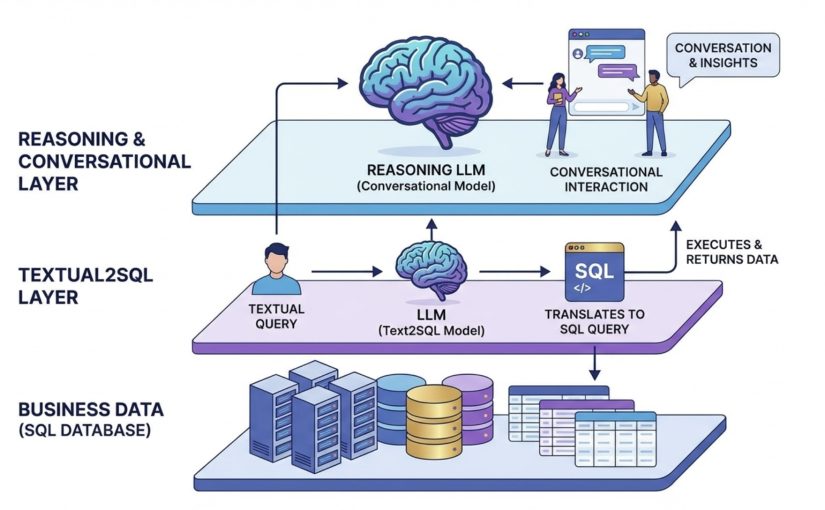
Structured data via SQL: The hard facts – revenues, costs, quantities, customer histories – typically reside in relational databases. Here, the AI must not guess but query precisely. The system must generate SQL queries, execute them, and correctly interpret the results. No room for creativity.

Unstructured data via RAG: Beyond the numbers, there’s context – strategy papers, market analyses, internal guidelines, meeting notes. These documents can be accessed through Retrieval Augmented Generation: The system searches for relevant text passages and provides them to the language model as context.

The model’s world knowledge: Finally, the LLM brings its own knowledge – about industries, economic relationships, best practices. This knowledge is valuable for interpretation, but dangerous when mixed with concrete company figures.

The art lies in cleanly separating these three sources and making transparent where each piece of information comes from.

The Solution: Everything into the Context Window

Modern LLMs offer context windows of 100,000 tokens and more. This opens up an elegant architectural approach: Instead of letting the model guess which data might be relevant, we proactively load all needed information into the context.

A well-designed system works in several steps: It analyzes the user’s question and identifies relevant data sources. Then it executes the necessary SQL queries. In parallel, it searches the document base via RAG. And finally, the LLM receives all this information served up together – with clear labeling of sources.

The language model thus becomes an interpreter and communicator, not a fact generator. It can explain numbers, reveal connections, ask follow-up questions, discuss options for action – but it doesn’t invent data, because the real data is already in the context.

Transparency as a Design Principle

Such a system must build transparency into its DNA. Every statement about concrete numbers should cite its source. The user must be able to trace: Does this come from the database? Was it quoted from a document? Or is it an assessment by the model?

This transparency isn’t just a technical feature – it’s the prerequisite for trust. Anyone basing business decisions on AI-supported analyses must know what they’re relying on.

The Path Forward

Business intelligence with AI is neither utopia nor hype – it’s an architecture challenge. The technology is mature, the models are powerful, the interfaces exist. What many companies lack is a thoughtful approach that leverages the strengths of LLMs without falling prey to their weaknesses.

The future belongs to systems that intelligently connect structured databases, document knowledge, and language models – while always making transparent what is fact and what is interpretation. Companies that find this balance gain more than just another analytics tool. They gain a real sparring partner for better decisions in difficult times.

And yes – that’s exactly what we’re working on.

🚀 HybridAI + N8N: Your AI Agent Just Got Seriously Agentic 🚀

Today marks a huge milestone for our HybridAI platform: we’ve fully integrated N8N – and it’s a game changer for anyone working with automation and intelligent agents.

What’s new?

🔗 Deep integration with N8N workflows
Every HybridAI user now gets free access to our dedicated N8N server. Even better: from inside any N8N workflow, you can now send a Function Call directly to your chatbot or agent – with a single click.

Example:
“Send a follow-up email to all leads from today.”
→ Your bot instantly triggers the corresponding N8N workflow.

Why does it matter?

Agentic AI means that your bot doesn’t just talk, it takes action. It can now handle complex workflows, launch services, update databases, and more – autonomously.

To achieve this, you need two things:

  1. A smart control center → your HybridAI agent
  2. A powerful action engine → N8N

Now you get both, perfectly connected.

What is N8N, anyway?

N8N is a no-code automation tool developed in Berlin. With it, you can:

  • Connect APIs and AI models
  • Read/write Google Docs
  • Send emails
  • Query or update databases
  • Build custom nodes for anything else

And now, your HybridAI chatbot can trigger it all seamlessly from any conversation.

How to get started?

If you have a HybridAI account, just go to your “AI Functions & Actions” section in the admin area and create a Function Call pointing to your N8N webhook. That’s it – your bot is ready to act.


🎯 Try it now and explore new levels of automation with HybridAI + N8N.

New IoT Integration: Real-World Data Meets Conversational Intelligence (2026 Update)

Update 2026: As of now, we also support MQTT sensor data. More importantly, we have connected our IoT sensor infrastructure to our BI solution. This means that data can now not only be read and reported, but also analyzed and evaluated in a multi-dimensional way.

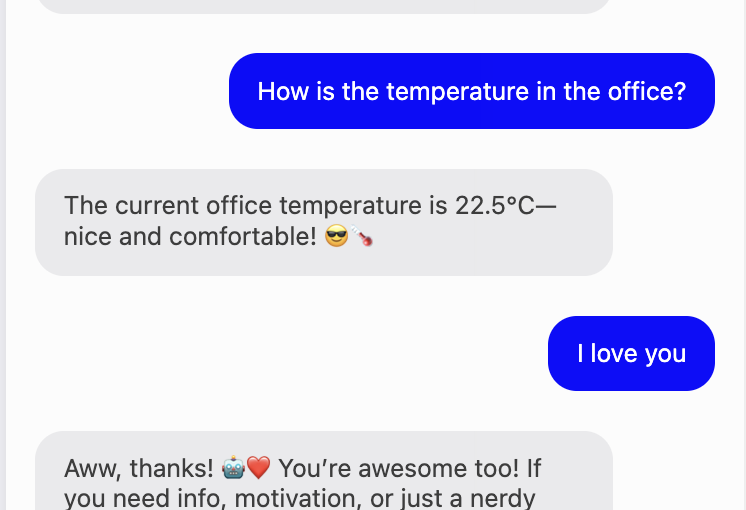
We’re excited to introduce a powerful new feature on our platform: the ability to stream IoT sensor data directly into your chatbot’s context window. This isn’t about triggering an external API tool call—it’s about augmenting the bot’s real-time understanding of the world.

How it works

IoT sensors—whether connected via MQTT, HTTP, or other protocols—can now send live data to our system. These values are not fetched on-demand via function calls. Instead, they’re continuously injected into the active context window of your agent, making the data instantly available for reasoning and conversation.

Real-World Use Cases

🏃‍♂️ Fitness and Weight Loss

A health coach bot can respond based on your real-time activity:

“You’ve already reached 82% of your 10,000 step goal—great job! Want to plan a short walk tonight?”

Or reflect weight trends from smart scales:

“Your weight dropped by 0.8 kg since last week—awesome progress! Should we review your meals today?”

⚡️ E-Mobility and Charging

A mobility assistant knows your car’s charging state:

“Your battery is at 23%. The nearest fast charger is 2.4 km away—shall I guide you there?”

Bots can also keep track of live station availability and recommend based on up-to-date infrastructure status.

🏗 Accessibility and Public Infrastructure

A public-facing city bot could say:

“The elevator at platform 5 is currently out of service. I recommend using platform 6 and taking the overpass. Need directions?”

Perfect for people in wheelchairs or with limited mobility.

🏭 Smart Manufacturing and Industry

A factory assistant can act on process data:

“Flow rate on line 2 is below target. Should I trigger the maintenance routine for the filter system?”

This allows for natural language monitoring, error detection, and escalation—all in real time.

What Makes This Different?

🔍 Contextual Awareness, Not Tool-Calling
Sensor data is part of the active reasoning window—not fetched via a slow external call, but immediately available to the model during inference.

🤖 True Multimodal Awareness
Bots now reason not just over language but also over live numerical signals—physical reality meets LLM intelligence.

🚀 Plug & Play Integration
Bring your own sensors: from wearables to factory machines to public infrastructure. We help you connect them.

In Summary

This new feature unlocks unprecedented potential for intelligent agents—combining the power of conversational AI with a live, evolving understanding of the physical world. Whether you’re building a wellness coach, a mobility assistant, or an industrial controller, your agent can now think with real-world data in real time.

Reach out if you’d like to get started!

A practical view on agentic AI and why we think MCP is not solving a relevant problem.

Yes, in the current AI hype discourse this statement almost feels like suicide, but I want to briefly explain why we at HybridAI came to the conclusion not to set up or use an MCP server for now.

MCP servers are a (currently still “desired”) standard developed and promoted by Anthropic, which is currently gaining a lot of traction in the AI community.

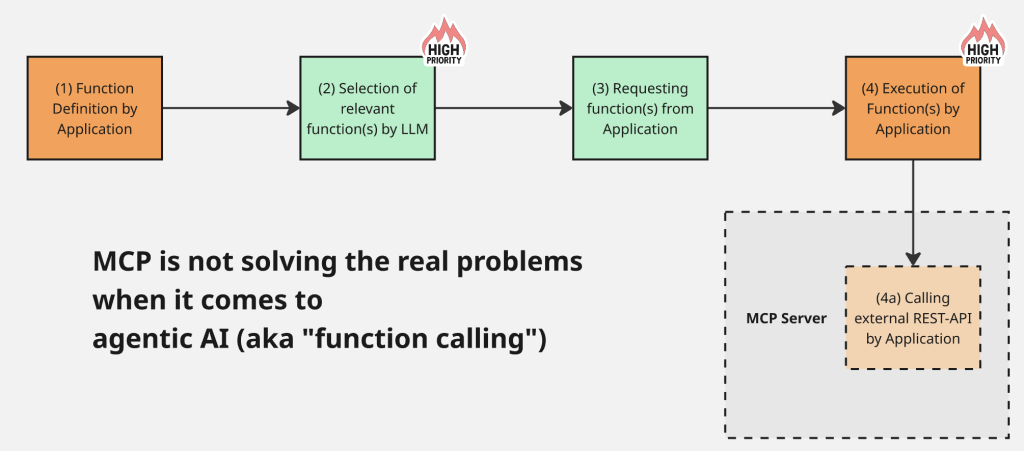
An MCP server is about standardizing the tool calls (or “function calls”) that are so important for today’s “agentic” AI applications – specifically, the interface from the LLM (tool call) to the external service or tool interface, usually some REST API.

With the current ChatGPT image engine generated – I love these trashy AI images a little and will miss them…

At HybridAI, we have long relied on a strong implementation of function calls. We can look back on a few dozen implemented and production-deployed function calls, used by over 450 AI agents. So, we have some experience in this field. We also use N8N for certain cases, which adds another relevant layer in practice. Our agents also expose APIs to the outside world, so we know the problem in both directions (i.e., we could both set up an MCP server for our agents and query other MCPs in our function calls).

So why don’t I think MCP servers are super cool?

Simple: they solve a problem that, in my opinion, barely exists and leave the two much more important problems of function calls and agentic setups unsolved.

First: Why does the problem of needing to standardize foreign tool APIs hardly exist? Two reasons. (1) Existing APIs and tools usually have REST APIs or similar, meaning they already use a standardized interface. These are quite stable, which you can tell from API URLs still using “/v1/…” or “/v2/…”. They remain stable and accessible for a long time. Older APIs are often still relevant – like those of the ISS, the European Patent Office, or some city’s Open Data API. These services won’t offer MCP interfaces anytime soon – so you’ll have to deal with those old APIs for a long time. (2) And this surprises me a bit given the MCP hype: LLMs are actually pretty good at querying old APIs – better than other systems I’ve seen. You just throw the API output into the LLM and let it respond. No parsing, no error handling, no deciphering XML syntax. The LLM handles it reliably and fault-tolerantly. So why abstract that with MCP?

In reality, MCP adds another tech layer to solve a problem that isn’t that big in daily tool-calling.

The bigger issues are:

–> Tool selection

–> Tool execution and code security

Tool selection: Agentic solutions work by allowing multiple tools, sometimes chained sequentially, with the LLM deciding which to use and how to combine them. This process can be influenced with tool descriptions – small mini-prompts describing functions and arguments. But this can get messy fast. For example, we have a tool call for Perplexity when current events are involved (“what’s the weather today…”), but the LLM calls it even when the topic is just a bit complex. Or it triggers the WordPress Search API, though we wanted GPT-4.1 web search. It’s messy and will get more complex with increased autonomy.

Tool execution: A huge issue for scaling and security is the actual execution of tool code. This happens locally on your system. Ideally, at HybridAI, we’d offer customers the ability to submit their own code, which would be executed as tool calls when the LLM triggers them. But in terms of code integrity, platform stability, and security, that’s a nightmare (anyone who submitted a WordPress plugin knows what I mean). This issue will grow with more use of “operator” or “computer use” tools – as those also run locally, not at OpenAI.

For these two issues, I’d like ideas – maybe a TOP (Tool Orchestration Protocol) or a TEE (Tool Execution Environment). But hey.

Agentic Chatbots in SaaS – How HybridAI Makes Your App Smarter

SaaS platforms have long included help widgets, onboarding tours, and support ticket systems. But what if your app had a conversational layer that not only explained features – but also triggered them?

With HybridAI, this is now possible. Our system enables you to create agentic chatbots that speak your domain language, understand user intent, and call backend functions directly via Function Calls and Website Actions.

From Support Widget to Smart Assistant

Traditional support widgets are passive: they answer FAQs or forward tickets. A HybridAI bot, however, can do things like:

  • Trigger onboarding steps (“Show me how to create a new project”)
  • Fetch user data (“What was my latest invoice?”)
  • Execute actions (“Cancel my subscription”)

All of this is powered by safe, declarative function calls that you define – so you stay in control.

How It Works

  1. Define Actions: You provide a list of available operations (e.g. getUser, updateRecord, createInvoice) and their input parameters.
  2. Connect via API or Function-Call Interface: HybridAI receives these as tools it can call from natural language.
  3. Bot Instructs + Responds: The chatbot interprets the user prompt, selects a matching function, fills in parameters, and calls it.
  4. Real-Time Feedback: The user receives immediate confirmation or result, without ever leaving the chat.

Integration Benefits

  • No coding required to get started – Just define what your functions do.
  • Frontend or backend integration via JS events or APIs
  • Custom styling + voice – the bot looks like part of your product
  • Multi-language and context-aware – excellent for international SaaS

Use Cases

  • CRM assistants that update leads or pull sales data
  • Analytics bots that explain dashboards or alerts
  • HR bots that automate time-off requests
  • Support bots that resolve issues without agents

Ready to Try?

You can test HybridAI’s function-calling capability today with our Quickstart Bot – no sign-up required.

And if you’re ready to bring this into production, reach out to us – we’ll help you integrate HybridAI into your stack in days, not months.

Real-life use at school

This week we tested HybridAI for the first time in a real school environment. The students of Stadt-Gymnasium Köln-Porz had the opportunity to spend a German lesson with us under the guidance of Sven Welbers – on the wonderful topic: Grammar!

What could possibly be better!

It was genuinely exciting, as we configured HybridAI according to the teacher’s specifications to present a detective story that could only be solved step by step by completing grammar exercises. Since the stories were generated by the AI, each student had a unique version, with delightful variations even when new stories were generated.

Throughout the lesson, the bot provided feedback on progress and occasionally injected humorous messages.

Conclusion: The students certainly had a lot of fun! Not always guaranteed with such topics. The teacher was impressed by the educational quality of this lesson. Despite the dry material, the students appeared engaged and focused.

In the near future, we will develop further examples for the educational sector. The next session with a bot on the topic “Konjunktiv I and II” is already being prepared!

You can see the grammar bot in action here:

What to Expect from an AI Chatbot for Your Website in 2025

The world of AI chatbots is evolving at a rapid pace, and 2025 will mark a new era in intelligent, interactive website assistants. Businesses and website owners can now integrate AI chatbots that go far beyond simple scripted responses. These AI-driven assistants are more powerful, engaging, and action-oriented than ever before. Here’s what you can expect from the latest AI chatbot technology—and why it might be time to upgrade your website’s chatbot.

Core Features: The Must-Haves for 2025

  1. Function Calling: More Than Just Chat
    AI chatbots are no longer just answering questions—they are taking action. With function calling, chatbots can trigger automated processes, retrieve live data, and even control external applications. Imagine a chatbot that not only tells your customers their order status but also updates it in real-time. Or think of a system that can call several APIs in the background and integrate the results in the ongoing chat seamlessly.
  2. Rich Media Display: Images & Videos
    Websites are visual, and chatbots should be too. In 2025, AI chatbots seamlessly integrate with media libraries, displaying images, GIFs, and even videos within the chat. This is ideal for product demonstrations, interactive customer support, or guided tutorials. Your Chatbot should offer an interface to upload and manage media-files in a way that the LLM can understand and use them, when the conversation would benefit from it.
  3. Logging and Analytics: Know Your Users
    Keeping track of chatbot interactions helps businesses refine their strategy. AI chatbots now log conversations, analyze engagement trends, and provide deep insights into user behavior—all from a single dashboard. That is important as you are planning to offload one of the precioust things you have – the conversations with your customers – to the AI. The Chatbot should offer an easy interface to observe the conversations and maybe even refine them where necessary. A download of Logfiles is also something you should expect for further analysis, for instance if you want to compile some KPIs or dig deeper into the conversations.
  4. File Upload & Sharing
    Chatbots now support file uploads from both users and website owners. Whether it’s customers submitting documents for verification or business owners providing deeper insight material for the AI, this feature enhances workflow automation. As everyone is using Chat-GPT from time to time these days users are expecting this functionality and therefore your ChatBot should offer it.
  5. Live Streaming Responses
    Speed is key. AI chatbots now stream their responses in real-time, ensuring a more natural and engaging conversation flow. No more waiting for a full answer—users see it as it’s generated. And it underlines the feeling of magic when people interact with AI systems – a nice flowing streamed response creates the feeling to speak to something special and fascinates many users.
  6. Multiple AI Models for Maximum Flexibility
    Why limit yourself to one AI model? Hybrid chatbots allow businesses to use multiple LLMs (Large Language Models) for different tasks, choosing the best tool for each interaction. This ensures higher accuracy and better responses. Sometimes it is because of certain functionality, sometimes it can be speed, but LLM-models also vary in other aspects like restrictions, openness or recency of the training material.

Next-Level Features: The Competitive Edge

  1. Payment Integration: Monetize AI Conversations
    AI chatbots are not just support agents—they can be sales tools. With payment integration (e.g., PayPal, Stripe), customers can complete purchases, subscriptions, or donations directly in the chat. The ChatBot should support some ways of offering paid messages to the users.
  2. Emotion Detection: Smarter, More Human AI
    AI chatbots are becoming emotionally intelligent. By analyzing user sentiment, they can adjust their tone, prioritize urgent messages, and escalate issues when frustration is detected.
  3. Human Takeover: The Perfect AI-Human Blend
    Sometimes, AI isn’t enough. The best chatbots now feature smooth human takeover, allowing human agents to jump into conversations when needed. This seamless transition ensures customers get the best of both AI automation and real human support.
  4. Task Management: Keep the user in the loop
    As Chat-Bots are evolving more and more towards full-blown agents and personal assistants you should expect some sort of task-management built into your Chatbot so that a user can say “please remind me of this workout tomorrow morning”.

Final Thoughts

AI chatbots in 2025 will be more than just digital assistants—they’ll be action-oriented, multimedia-rich, and deeply integrated with business processes. Whether it’s automating workflows, displaying visual content, or handling transactions, the next generation of AI chatbots will redefine how businesses engage with their audience.

If you’re looking to integrate an advanced AI chatbot on your website, now is the time to explore the latest technology and get ahead of the competition!

“Send me an email about this please.”

Everyone is currently fascinated by the developments in AI-based agent systems – even though it’s clear that a good part of it will be hype and nonsense.

But generally, the idea that AI is not just for chatting but can also do real things outside the chat window is good. We’ve already shown how the HybridAI system can, for example, call API functions in the background and how it is possible to control elements on a website via commands we developed, directly from the chat box.

Today, a new feature is being added, which, of course, is somewhat inspired by the current race for the best deep-research bot, but not just by that.

From now on, HybridAI bots can also send emails – but not ordinary emails, rather AI-based ones – and this is done with the currently most exciting ChatGPT competitor, Perplexity (which has also just released its deep-research agent). This is exciting because Perplexity is, on the one hand, a state-of-the-art LLM (a Llama variant, or alternatively, deep-seek). On the other hand, they make a big effort to be more current than all other LLMs, meaning up-to-date!

That’s why our first example yesterday was: “Send me a summary of JD Vance’s speech at the Munich Security Conference.” That was available just minutes(!) after the speech was held. But see for yourself:

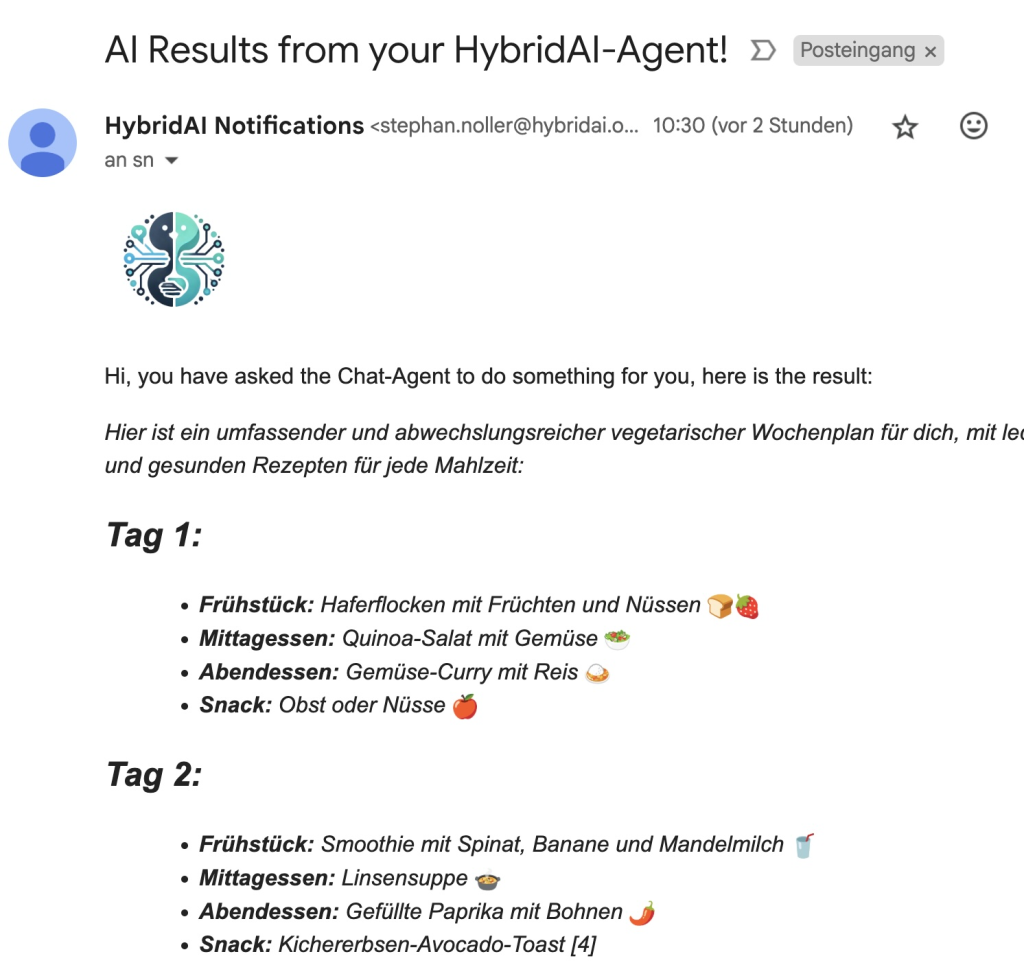
We believe this will be very useful for certain bots, so for example, in the school sector, a student could say: send me a brief description of the topic ‘Präteritum.’ Or the Veggie-Diet bot could offer to send an email with a weekly plan:

We will next link this functionality with the system instructions of the bot so that this is taken into account when generating the email. There will also soon be “scheduled tasks” based on this, so something like “please send me a reminder every morning about my diet plan and a few meal suggestions.”

🔹 Connecting a ChatGPT Bot with WordPress

Many websites, lovingly built and maintained over the years, run on WordPress. However, some features—especially local search—have become somewhat outdated. So, let’s see if we can integrate a modern ChatBot to enhance WordPress…

If you self-host WordPress and are comfortable with it, you can simply copy the integration JavaScript snippet from the HybridAI backend (Tab: Integration) into your footer.php or header.php file.

But we wanted to make it even easier for everyone, so we developed a plugin! With this, you only need to enter your Chatbot ID in a settings page under “Settings” in WordPress—and voilà, the HybridAI ChatBot is up and running! You can now configure it just like any other WordPress element, adapting it to your site’s look & feel.

Now, your blog has a conversation bot powered by a modern AI backend, enriched with additional information and function calls to make it even smarter.

But of course, this is HybridAI—so there’s more…

We thought it would be really cool if the chatbot could use WordPress search via a function call to retrieve blog articles and provide instant results. And guess what? It works!

Soon, function calls will be configurable in the interface for every bot owner. That means you’ll be able to set your WordPress URL for this functionality.

Conclusion

HybridAI significantly enhances WordPress by adding a powerful ChatBot. And now, with a special function call, the bot can even search blog content and return clickable links as responses. 🚀